
Solving a write-tests challenge
Some DojoCode challenges ask you to write tests instead of code. The implementation is already there and it is correct. Your job is to write a test suite good enough to notice when that implementation breaks. 🕵️
You can recognize a write-tests challenge by the blue hint above the description:
Write tests for the reference solution. Your tests must pass on the correct implementation and fail on every hidden buggy variant.
How it works
Behind the scenes the challenge author prepared a few hidden buggy variants of the reference solution. Each one contains a single small bug: a wrong boundary, a missing validation, a wrong value. When you verify or submit your tests, DojoCode checks them in two steps:
- Against the reference solution. All your tests must pass. A test that fails on correct code is a wrong test.
- Against every hidden buggy variant. For each variant, at least one of your tests must fail. When that happens, the variant is caught.
You complete the challenge when your tests pass on the reference solution and catch every hidden buggy variant.
The action bar has a button for each stage of your work:
| Button | What it runs |
|---|---|
| Test | Your tests against the reference solution only, with the result of each test. |
| Verify tests | Both steps above, without submitting. |
| Submit | Both steps above, and the result counts for your score. |
The workspace
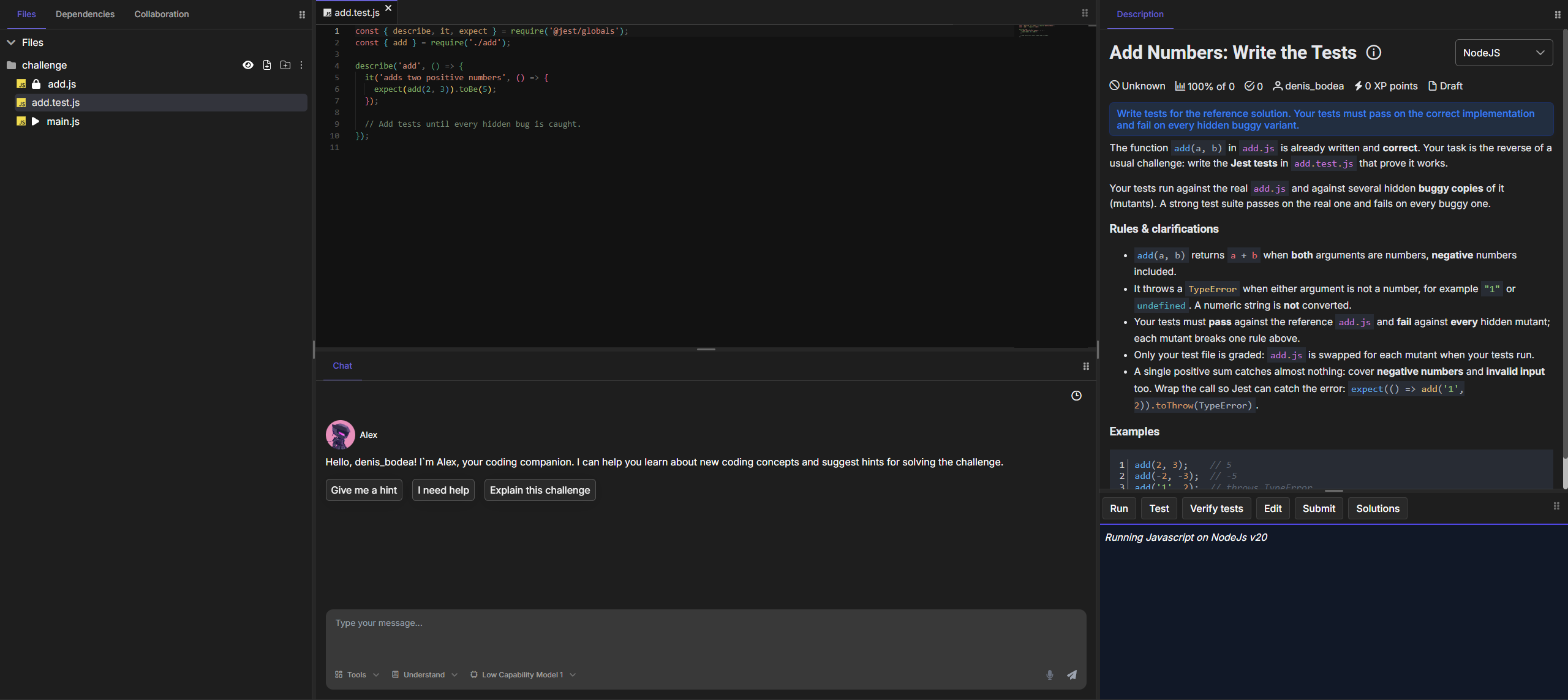
Fig. 1 - The Add Numbers: Write the Tests challenge: add.js is locked, the starter test is open, and the description lists the rules your tests must pin down
- The reference solution is visible and marked with a lock 🔒. Read it carefully: it is the behavior your tests must describe. You cannot edit it, and a file you create at the same path is ignored when your tests run.
- The starter test is the file you work in. It already contains one passing test to show the structure and the imports. Add your own tests next to it, or create new test files.
- The main file (marked with ▶) is the Run entry point, when the template has one. Use Run to call the reference solution and print values while you explore it.
Running your tests
Click Test to run your tests against the reference solution only. The results panel shows the same results as a classic challenge: a summary of passed and failed tests, the result of each test, the console output and any errors. The hidden buggy variants are not checked, so use Test as often as you like while you write and debug your tests.

Fig. 2 - Test runs the starter test and a new test for negative numbers against the reference solution only: both pass, and the console.log output appears under Log.
Every test must pass here. A test that fails on the reference solution expects the wrong behavior: fix the expectation so it matches what the reference solution really does. Click What did I do wrong? to get an explanation from the AI assistant.
Verifying your tests
Click Verify tests to check your tests exactly like Submit does, without submitting: first against the reference solution, then against every hidden buggy variant. The results panel shows one of three outcomes.
Your tests fail on the reference solution
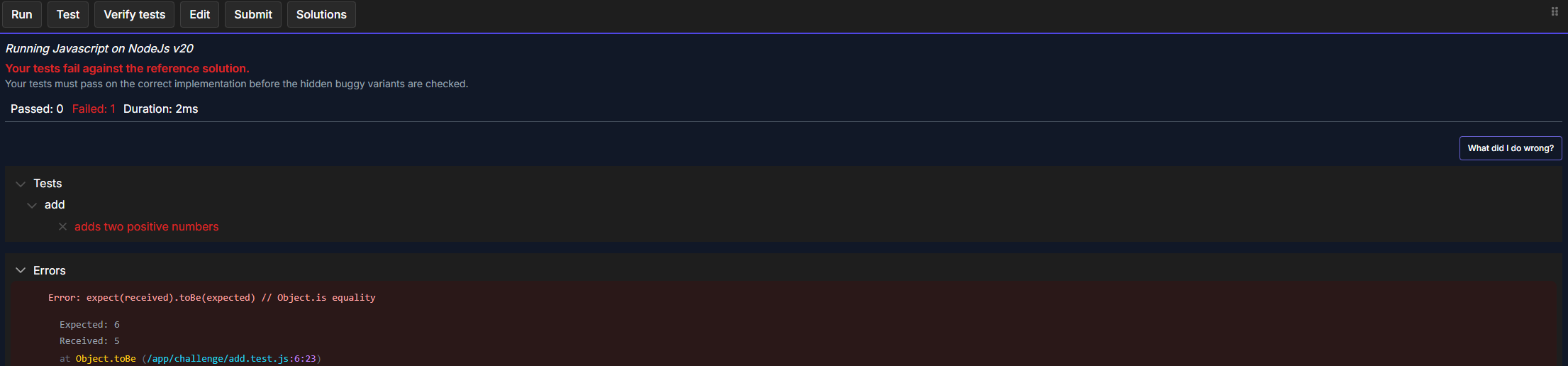
Fig. 3 - The test expects 6 for add(2, 3), so it fails on the correct implementation (Expected: 6, Received: 5). The panel lists your failing tests, as in a classic challenge, and the hidden buggy variants are not checked yet.
In this state the results panel looks like the results of a classic challenge: a summary of passed and failed tests and the tree of failing tests. The difference is that the failing tests are yours, run against correct code, so the test is wrong, not the implementation. The hidden variants are only checked once every test passes.
Fix the failing tests first: your expectations must match what the reference solution really does. Use Test while you fix them, then verify again.
Your tests miss some hidden bugs
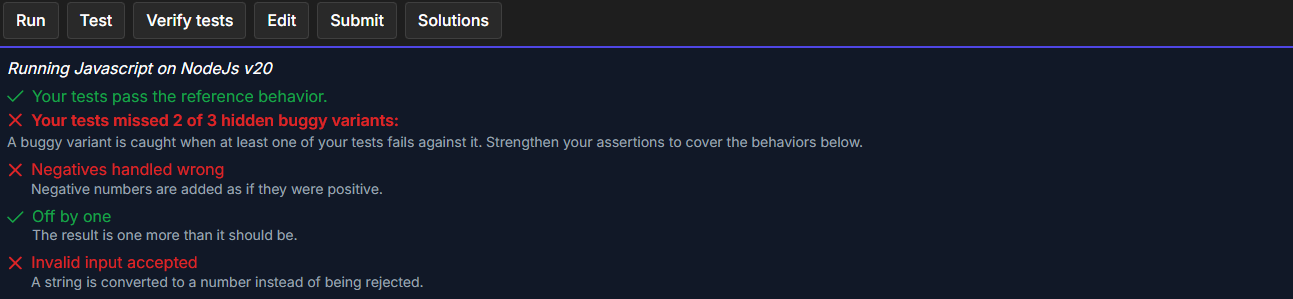
Fig. 4 - Only the starter test is written: it passes on the reference solution and catches "Off by one", but two variants survive
Every hidden variant is listed with a label and a short description of the behavior it breaks. A green check means one of your tests caught it. A red cross means all your tests still pass when that bug is present. Read the description, then add a test that pins down exactly that behavior.
In the example above, the only test is expect(add(2, 3)).toBe(5). It catches "Off by one", because that variant returns 6. The other two survive: with two positive numbers, Math.abs changes nothing, and no test passes a string. Adding expect(add(-2, -3)).toBe(-5) and expect(() => add('1', 2)).toThrow(TypeError) catches both.
Every hidden bug is caught
When your tests pass on the reference solution and every variant shows a green check, the panel reports All N hidden buggy variants caught. Great tests!, where N is the number of variants. You are ready to submit.
Submitting
Click Submit to send your tests for the final check. The submission runs exactly like Verify tests, and the result counts like any other challenge: XP, streaks, contest progress and badges all apply.
Each hidden variant counts as one extra hidden test in your score. A variant your tests missed appears as Hidden bug not caught: <label> and counts as a failed test, so a green run on the reference solution alone is never 100%.
Tips for catching every bug
- Test the boundaries. Most planted bugs live at the edges: empty input, zero, the first and last element, the exact limit of a range.
- Test the errors. If the reference solution throws, rejects a request or disables a button, assert on it. A missing validation is a classic hidden bug.
- Assert exact values.
toEqual('Hello World!')catches far more thantoBeTruthy()or a type check. - Choose telling inputs. Pick inputs where a bug would show.
add(2, 3)cannot reveal a bug with negative numbers,add(-2, -3)can. - Read the labels. The label and description of a missed variant tell you which behavior to test next.
- Test first, verify after. Use Test for quick feedback on each test while you write, and Verify tests once your tests pass, to see which hidden bugs they catch.
Related pages
- 🥋 Solving a challenge
- 🧪 Write-tests challenges: how authors build these challenges
- 📚 Write-tests examples by template