
Write-tests challenges
In a classic code challenge the learner writes the implementation and your tests check it. A write-tests challenge flips the roles: you provide a correct implementation, and the learner writes the unit tests for it. 🧪
To prove that the learner's tests are actually good, DojoCode runs them twice:
- Against your reference solution, the correct implementation. Every test must pass.
- Against every mutant, a copy of the reference solution with one small, realistic bug you planted on purpose. At least one test must fail on each mutant.
A mutant that makes at least one test fail is caught. The learner completes the challenge when their tests pass on the reference solution and catch every mutant. This technique is known as mutation testing, and it is the most honest way to measure whether a test suite really pins down behavior.
When to use this mode
Write-tests challenges are a great fit for teaching testing itself: edge cases, boundaries, error handling, and testing UI components or HTTP endpoints. Learners read real code and have to think about how it could break.
Supported templates
The Write tests mode is available for these templates:
| Group | Templates | Test runner |
|---|---|---|
| Terminal | Node.js, Node.js with TypeScript | Jest |
| Terminal | Python | pytest |
| Backend with API tester | NestJS | Vitest + @nestjs/testing |
| Backend with API tester | Fastify, Hono | Vitest |
| Browser | Svelte, Vanilla JavaScript, Vanilla TypeScript, Angular, React, React with TypeScript, Vue, Vue with TypeScript | Jest + Testing Library |
| Browser | SolidJS, SolidJS with TypeScript | Vitest + Testing Library |
A complete, verified example for every template is available in Write-tests examples by template.
Creating a write-tests draft
- Open My Challenges and click NEW DRAFT.
- Enter a Title and select a template that supports the mode.
- Choose Write tests in the mode selector under the title (Fig. 1). The selector only appears for supported templates. Selecting another template switches the draft back to Write Solution.
- Click Create draft.
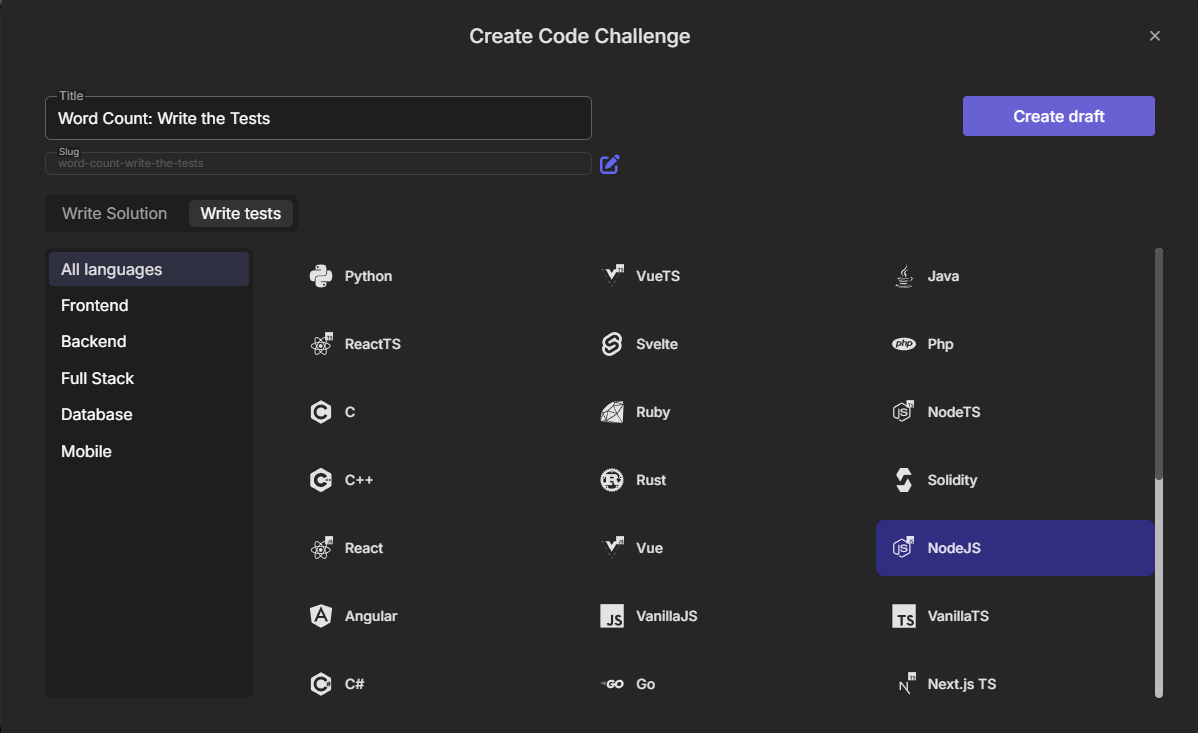
Fig. 1 - The mode selector in the Create Code Challenge modal, with Write tests selected for NodeJS
The mode is chosen once
The mode is set when the draft is created and cannot be changed later. To turn a classic challenge into a write-tests challenge, create a new draft in Write tests mode.
The new draft does not start empty. Every supported template ships a small working example: a starter test, a reference solution, an author reference suite and two mutants. You can run it immediately and then replace it with your own challenge.
The edit page
A write-tests draft uses the same edit page as a classic challenge, with different file categories in the Files panel (Fig. 2).
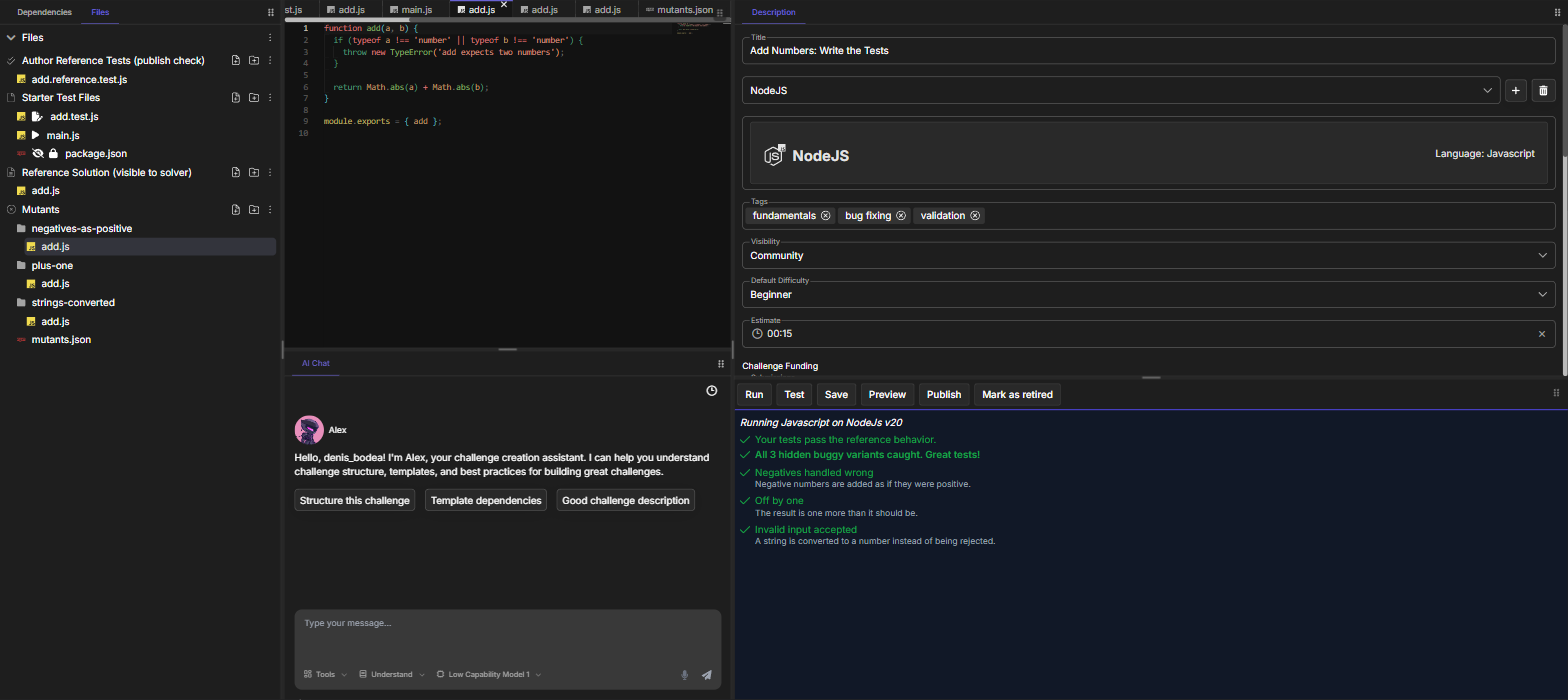
Fig. 2 - The edit page of the Node.js Add Numbers: Write the Tests challenge after a successful Test run
| Category | Who sees it | What goes in it |
|---|---|---|
| Starter Test Files | The learner, editable | The test file the learner starts from, plus supporting files such as the Run entry point (main.js, main.py) or the web entry files of browser templates. |
| Reference Solution (visible to solver) | The learner, read-only | The correct implementation. The learner reads it to understand what to test. |
| Author Reference Tests (publish check) | Only you | Your own test suite. It proves the challenge is solvable: it must pass on the reference solution and catch every mutant. |
| Mutants | Nobody, only their labels | The buggy variants of the reference solution, one folder per mutant, plus mutants.json. |
| Initial Tests | Nobody | Not used in write-tests mode. It only appears on drafts where the template starter filled it, and you can leave it as it is. |
The file flags from classic challenges still apply to Starter Test Files: hidden, read-only, initially opened and main file. See Create a code challenge for their meaning.
The reference solution always wins
When a learner's workspace contains a file at the same path as a reference solution file, the platform ignores the learner's copy and runs the real reference solution. The learner cannot change the implementation under test.
Mutants
Every top-level folder inside Mutants is one mutant. Its files replace the reference solution files that have the same relative path. For example, Mutants/plus-one/add.js replaces add.js from the reference solution while that mutant runs. Every other file of the reference solution stays the same.
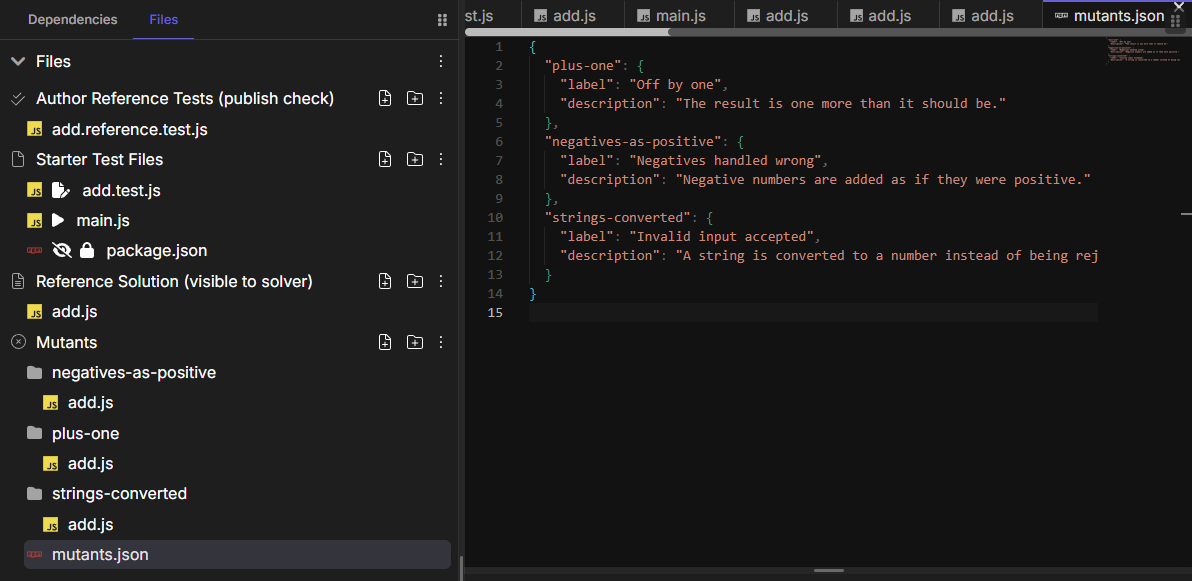
Fig. 3 - Three mutant folders and the mutants.json file that labels them
A mutant file is a full copy of the reference file with one subtle change (Fig. 4):
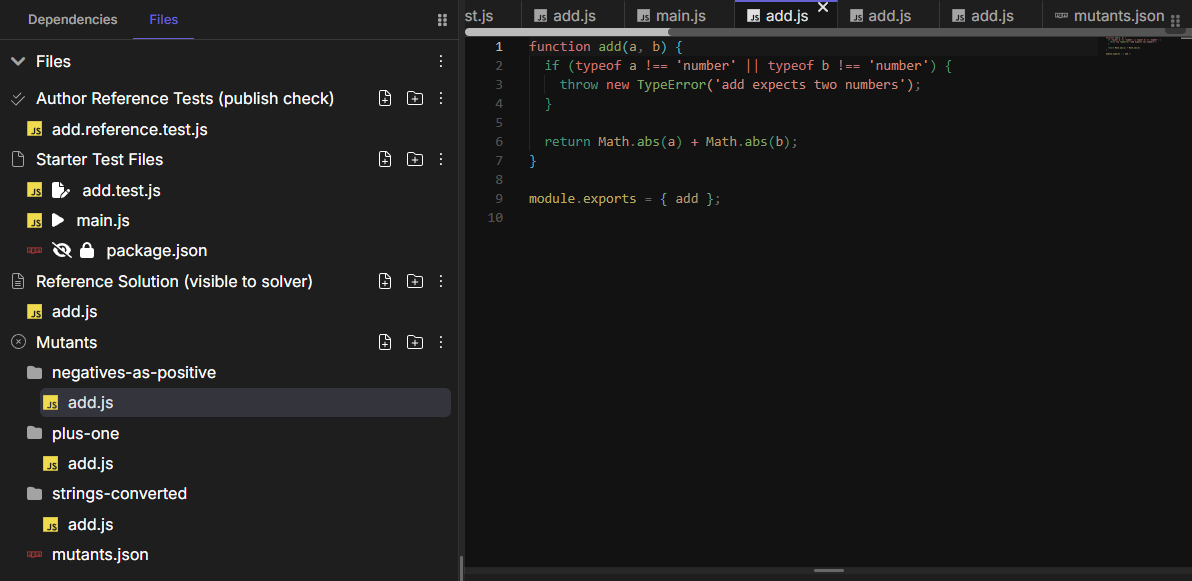
Fig. 4 - The negatives-as-positive mutant keeps the same API and the same validation, and only adds absolute values to the result
For templates with a src/ folder, the mutant folder mirrors it: Mutants/percent-over-100/src/discount.service.ts replaces src/discount.service.ts.
The mutants.json file
mutants.json sits at the root of Mutants and gives every mutant a label and a short description:
{
  "plus-one": {
    "label": "Off by one",
    "description": "The result is one more than it should be."
  },
  "negatives-as-positive": {
    "label": "Negatives handled wrong",
    "description": "Negative numbers are added as if they were positive."
  },
  "strings-converted": {
    "label": "Invalid input accepted",
    "description": "A string is converted to a number instead of being rejected."
  }
}The keys are the mutant folder names. The learner sees the label and the description in the results panel, whether the mutant was caught or not. Write them as hints about the behavior that breaks, without pasting the buggy line. A mutant without an entry is shown with its folder name.
Rules for mutants
The platform checks the structure of Mutants before running anything:
- There is at least one mutant folder, and every mutant folder contains at least one file.
- The only file allowed directly at the root of Mutants is
mutants.json. - Every mutant file must replace an existing reference solution file. A mutant cannot add new files.
Writing good mutants
- One realistic bug per mutant. Off-by-one boundaries, a wrong operator, a missing validation, swapped branches, a wrong status code, a missing
disabledstate. Each mutant should teach one testing lesson. - Keep the public API identical. Same exports, same function signatures, same component markup structure. A mutant that fails to compile or crashes on import is caught by any test, so it teaches nothing.
- Avoid endless loops. A mutant run that times out is never counted as caught.
- Make every mutant catchable. A mutant that behaves exactly like the reference solution for every input (an equivalent mutant) can never be caught, and the challenge cannot be completed. Your author reference tests will reveal it before you publish.
- Start with 2 to 4 mutants. They should cover different behaviors, such as the happy path, a boundary and an error case.
Testing your challenge
Click Test in the action bar. On the edit page of a write-tests challenge, Test runs your Author Reference Tests together with the Starter Test Files, the same workspace a learner submits:
- First against the reference solution. If any test fails, the run stops and shows the failing tests.
- Then against every mutant, one after the other. Each mutant is reported as caught or missed.
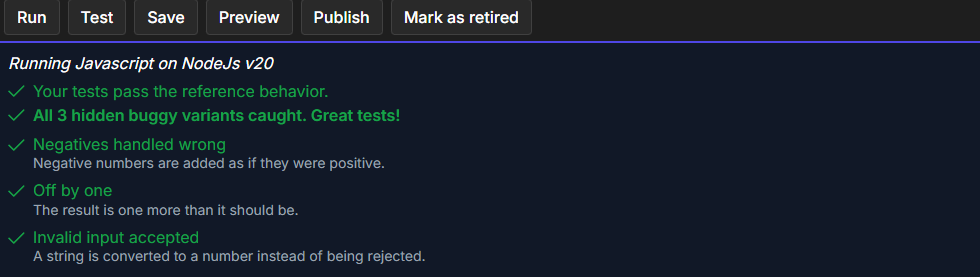
Fig. 5 - A successful run: the reference behavior passes and all mutants are caught
Test always uses the files currently open in the editor, including unsaved changes. The Test All button of classic challenges does not exist in this mode.
Keep the starter test honest
Because the starter test runs next to your reference suite, it must pass on the reference solution too. A good starter test covers one obvious case and leaves most mutants for the learner to catch.
Publishing
Before publishing, the challenge needs a starter test file, a reference solution, an author reference suite and at least one mutant that contains a file.
When you click Publish, every template variation of the challenge is validated in the background:
- The mutant rules above are checked.
- Your author reference tests (with the starter files) run against the reference solution and every mutant of that variation.
The challenge is published only if, for every variation, the reference run is green and every mutant is caught. Otherwise the validation window shows the failing variation with the same report as the Test button.
Adding other templates
Use the + button next to the template selector to add a variation in another language. Only templates that support write-tests challenges can be added. The new variation starts from that template's write-tests example, with its own starter test, reference solution, author reference suite and mutants.
Let the AI assistant help
The AI Chat on the edit page knows the write-tests conventions of every supported template. Ask it to draft mutants for your reference solution or to strengthen your author reference tests, then run Test to check the result.
Walkthrough: Node.js
The Add Numbers: Write the Tests challenge is a complete, small example. The function is trivial, so the whole challenge is about the tests: negative numbers, the result itself and invalid input.
Reference solution (visible to solver)
function add(a, b) {
  if (typeof a !== "number" || typeof b !== "number") {
    throw new TypeError("add expects two numbers");
  }

  return a + b;
}

module.exports = { add };Starter test, the file the learner opens first. It covers the obvious case and leaves the rest to the learner.
const { describe, it, expect } = require('@jest/globals');
const { add } = require('./add');

describe('add', () => {
  it('adds two positive numbers', () => {
    expect(add(2, 3)).toBe(5);
  });

  // Add tests until every hidden bug is caught.
});Author reference tests (publish check). One test per behavior that a mutant breaks:
const { describe, it, expect } = require('@jest/globals');
const { add } = require('./add');

describe('add (reference suite)', () => {
  it('adds two positive numbers', () => {
    expect(add(1, 2)).toBe(3);
  });

  it('adds negative numbers correctly', () => {
    expect(add(-2, -3)).toBe(-5);
    expect(add(-2, 5)).toBe(3);
  });

  it('throws a TypeError when an argument is not a number', () => {
    expect(() => add('1', 2)).toThrow(TypeError);
    expect(() => add(1, undefined)).toThrow(TypeError);
  });
});Mutants. Each folder holds a buggy copy of add.js with one change:
function add(a, b) {
  if (typeof a !== 'number' || typeof b !== 'number') {
    throw new TypeError('add expects two numbers');
  }

  return a + b + 1;
}

module.exports = { add };function add(a, b) {
if (typeof a !== 'number' || typeof b !== 'number') {
throw new TypeError('add expects two numbers');
}
return Math.abs(a) + Math.abs(b);
}
module.exports = { add };function add(a, b) {
return Number(a) + Number(b);
}
module.exports = { add };Notice how each mutant maps to one test of the reference suite:
| Mutant | What changes | Caught by |
|---|---|---|
plus-one | Every result is one too high | Any exact sum, even the starter test add(2, 3) |
negatives-as-positive | add(-2, -3) returns 5 | A sum with a negative operand |
strings-converted | add('1', 2) returns 3 instead of throwing | expect(() => add('1', 2)).toThrow(TypeError) |
Click Test: the reference behavior passes and all three mutants are caught (Fig. 5). The starter test alone only catches plus-one, which is exactly the gap the learner has to close.
Walkthrough: Python
The Python variation of the same challenge has the same structure, with pytest (Fig. 6).
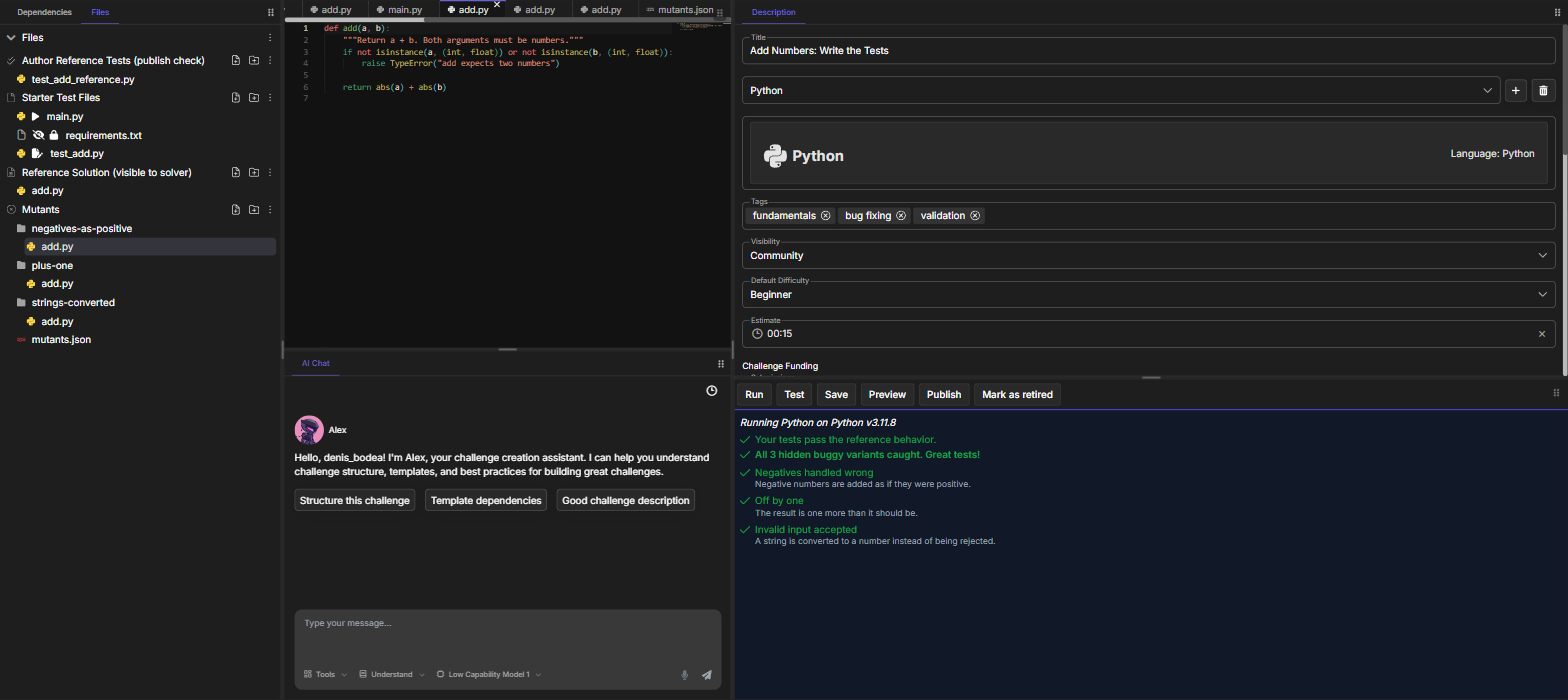
Fig. 6 - The Python variation with the negatives-as-positive mutant open and all 3 mutants caught
Reference solution (visible to solver)
def add(a, b):
    """Return a + b. Both arguments must be numbers."""
    if not isinstance(a, (int, float)) or not isinstance(b, (int, float)):
        raise TypeError("add expects two numbers")

return a + bStarter test. Tests import the solution through the challenge package:
from pytest import mark as m
from challenge.add import add


@m.describe("add")
class TestAdd:
    @m.it("Adds two positive numbers")
    def test_positive(self):
        assert add(2, 3) == 5

# Add tests until every hidden bug is caught.Author reference tests (publish check)
import pytest
from pytest import mark as m
from challenge.add import add


@m.describe("add (reference suite)")
class TestAddReference:
    @m.it("Adds two positive numbers")
    def test_positive(self):
        assert add(1, 2) == 3

    @m.it("Adds negative numbers correctly")
    def test_negative(self):
        assert add(-2, -3) == -5
        assert add(-2, 5) == 3

    @m.it("Raises a TypeError when an argument is not a number")
    def test_not_a_number(self):
        with pytest.raises(TypeError):
            add("1", 2)
        with pytest.raises(TypeError):
add(1, None)Mutants. The same three bugs, written in Python. The variation reuses the same mutants.json.
def add(a, b):
    """Return a + b. Both arguments must be numbers."""
    if not isinstance(a, (int, float)) or not isinstance(b, (int, float)):
        raise TypeError("add expects two numbers")

return a + b + 1def add(a, b):
"""Return a + b. Both arguments must be numbers."""
if not isinstance(a, (int, float)) or not isinstance(b, (int, float)):
raise TypeError("add expects two numbers")
return abs(a) + abs(b)def add(a, b):
"""Return a + b. Both arguments must be numbers."""
return float(a) + float(b)main.py stays the Run entry point. It imports without the package prefix (from add import add), so learners can print values while they explore the code.
Related pages
- 📚 Write-tests examples by template: a complete example for all 16 supported templates
- 🧪 Solving a write-tests challenge: what the learner sees and how results are scored
- 🛠️ Create a code challenge: the edit page, file flags and publishing
- 📋 Challenge authoring guidelines