
AI Models Access
The DojoCode SDK is the built-in connection every DojoCode project gets to platform services — and its headline capability is access to real AI models. Your project can write text, look at photos, paint images, animate videos, compose music, speak with a cloned voice and transcribe recordings, with no API keys, no setup and no external accounts.
You can use it two ways:
- Just ask the project assistant. Describe the feature in the project's AI chat ("add a button that turns my prompt into a short video") and the assistant writes working code for your template.
- Call it yourself. The SDK is a small HTTP API. Every template gets the connection injected automatically, and this page has copy-paste examples for each one.
Premium feature
AI models access needs an active premium subscription — a personal Premium plan, or membership in an organization on a paid plan. Every generation costs AI tokens from the balance of the signed-in user who runs the project (see Pricing).
Projects only
The SDK is available in projects — both while you edit them and in their preview. It is not available inside challenges. Projects built on the PGlite, SQLite and Solidity templates have no app code that could call it, and C and C++ projects can't call it yet.
What you can build
| Modality | What it does | Try building | Powered by |
|---|---|---|---|
text-to-text | Writes, summarizes, translates, answers, returns JSON | a quiz generator, a story writer, a code explainer | Llama 3 (8B) |
image-to-text | Looks at a photo and answers in text | a plant identifier, a photo grader, alt-text writer | GPT-4o mini |
text-to-image | Paints images from a description | a wallpaper maker, a sticker generator | FLUX schnell |
image-to-image | Transforms a photo following a prompt | "turn my selfie into a watercolor" | FLUX dev |
text-to-video | Generates a short video clip from a description | an animated scene generator | LTX-Video |
image-to-video | Animates a still picture | "make this landscape come alive" | LTX-Video |
text-to-music | Composes an instrumental track | a background-music maker for your game | MusicGen |
text-to-speech | Speaks text in a cloned voice | a narrator that sounds like you | Fish Speech |
speech-to-text | Transcribes (and translates) a recording | voice notes, subtitles for a clip | Whisper |
The models behind each modality can change as better ones become available; the modality names, inputs and outputs on this page stay the same.
Build it by asking the assistant
- Create a project from any template (React, Vue, Next.js, Python, Go, …) or open one you already have.
- Open the AI Chat panel and describe the feature in plain language.
- The assistant already knows how the SDK works in your template — which variables to read, how to handle slow generations, how to show the result — and writes the code.
- Use the feature in the preview (or press Run for templates without a preview).
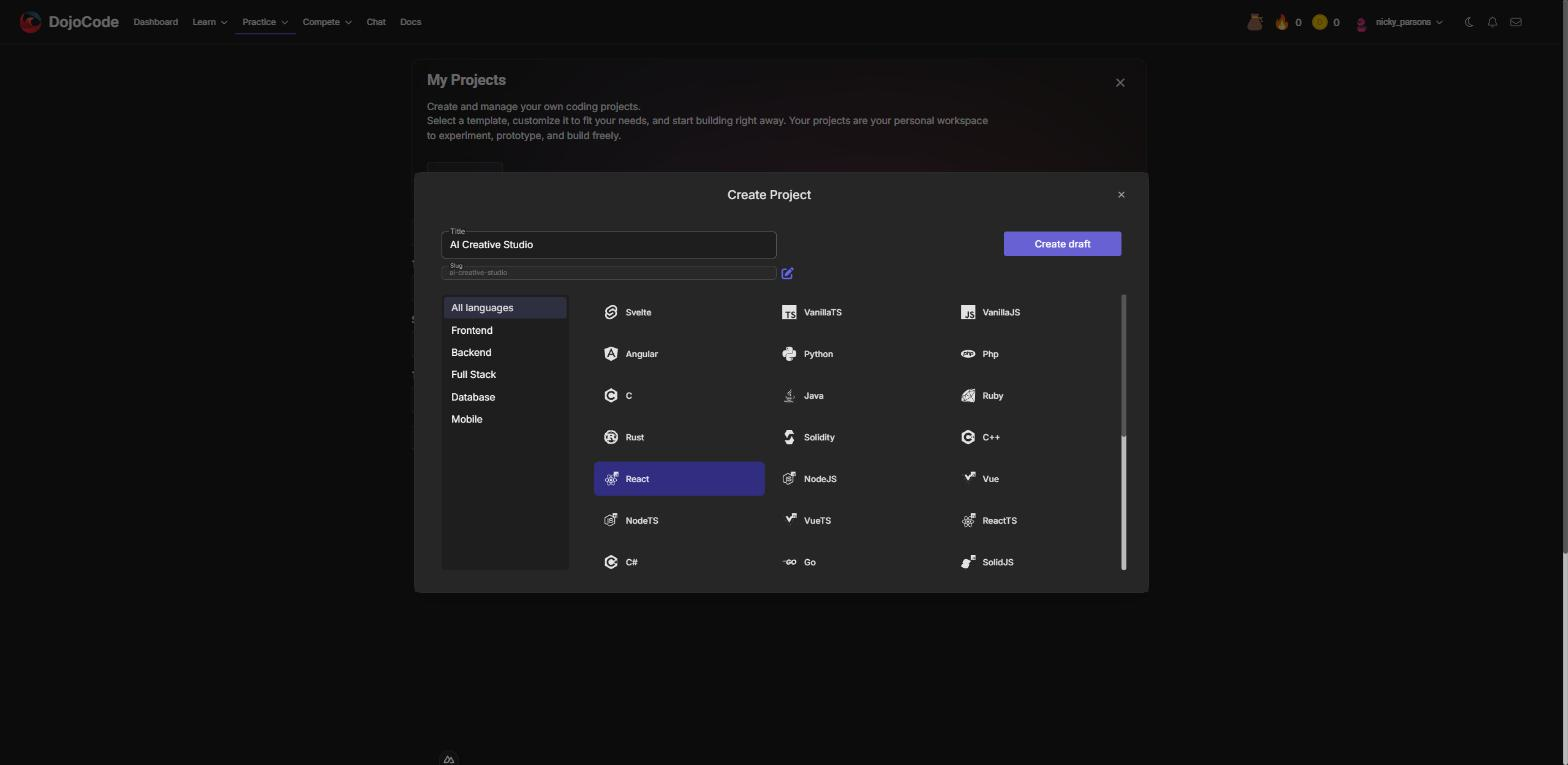
Fig. 1 - Create a project from any template
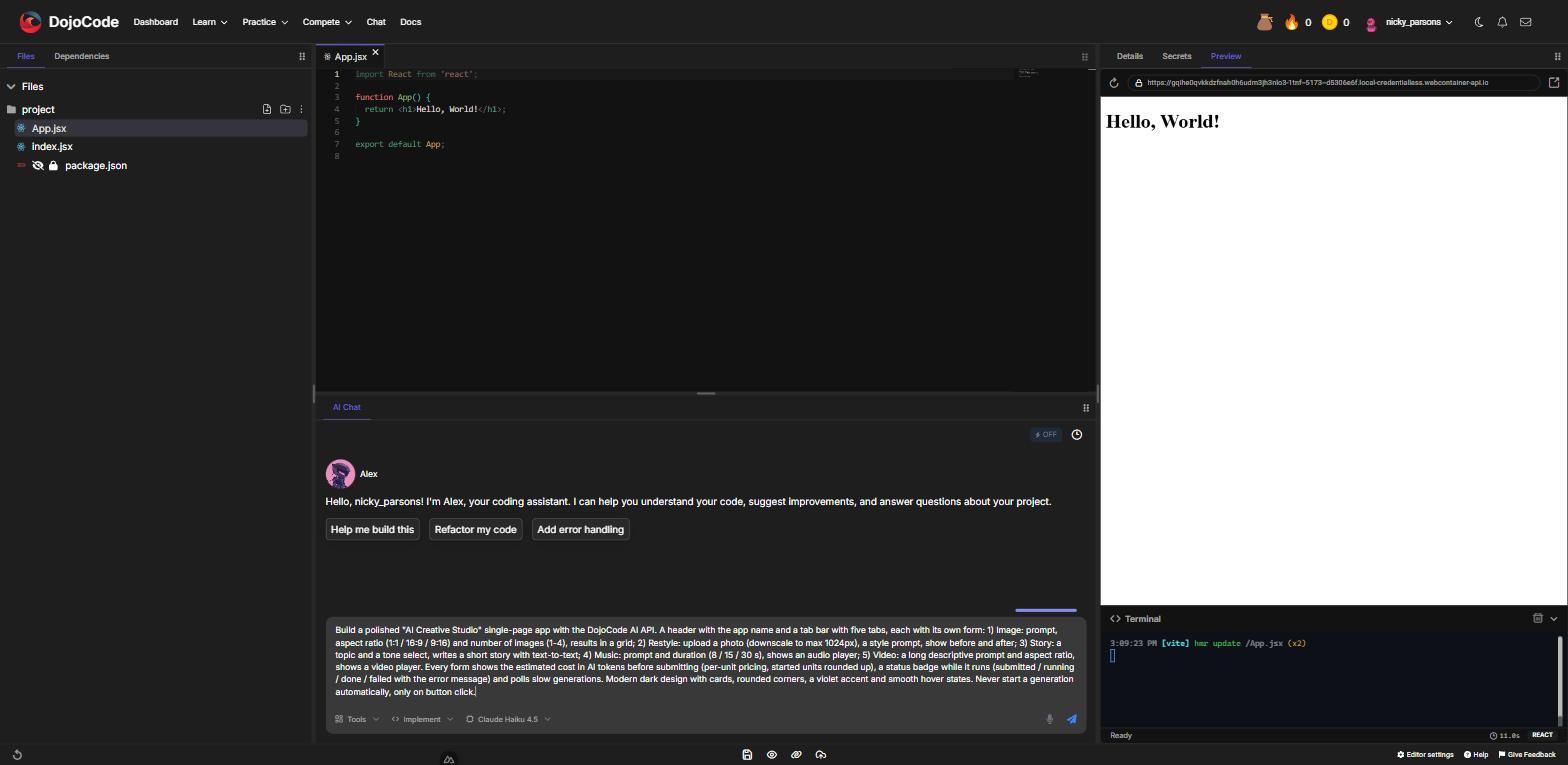
Fig. 2 - Describe the feature in the AI Chat panel
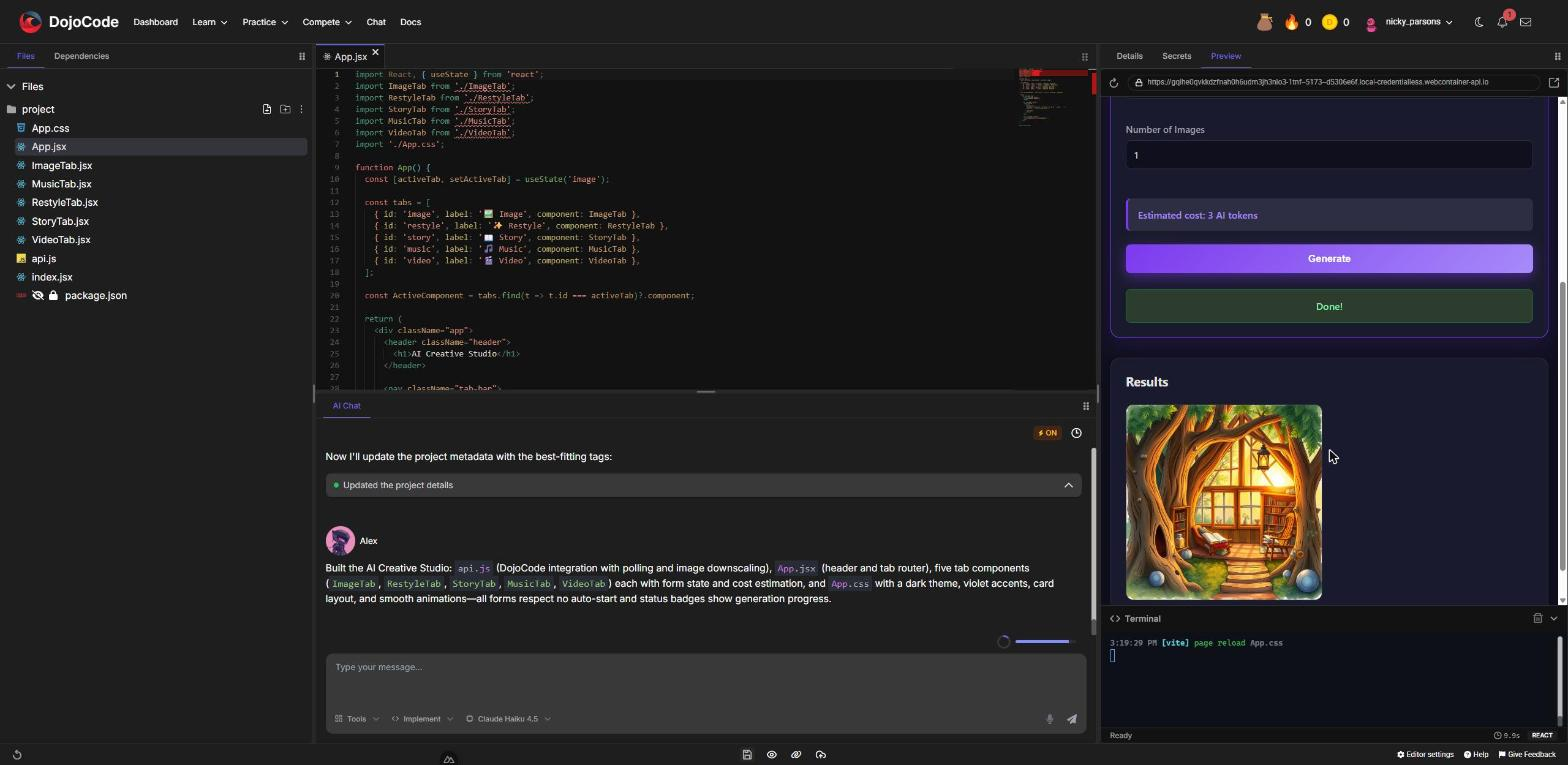
Fig. 3 - The assistant builds the app; clicking Generate calls a real AI model
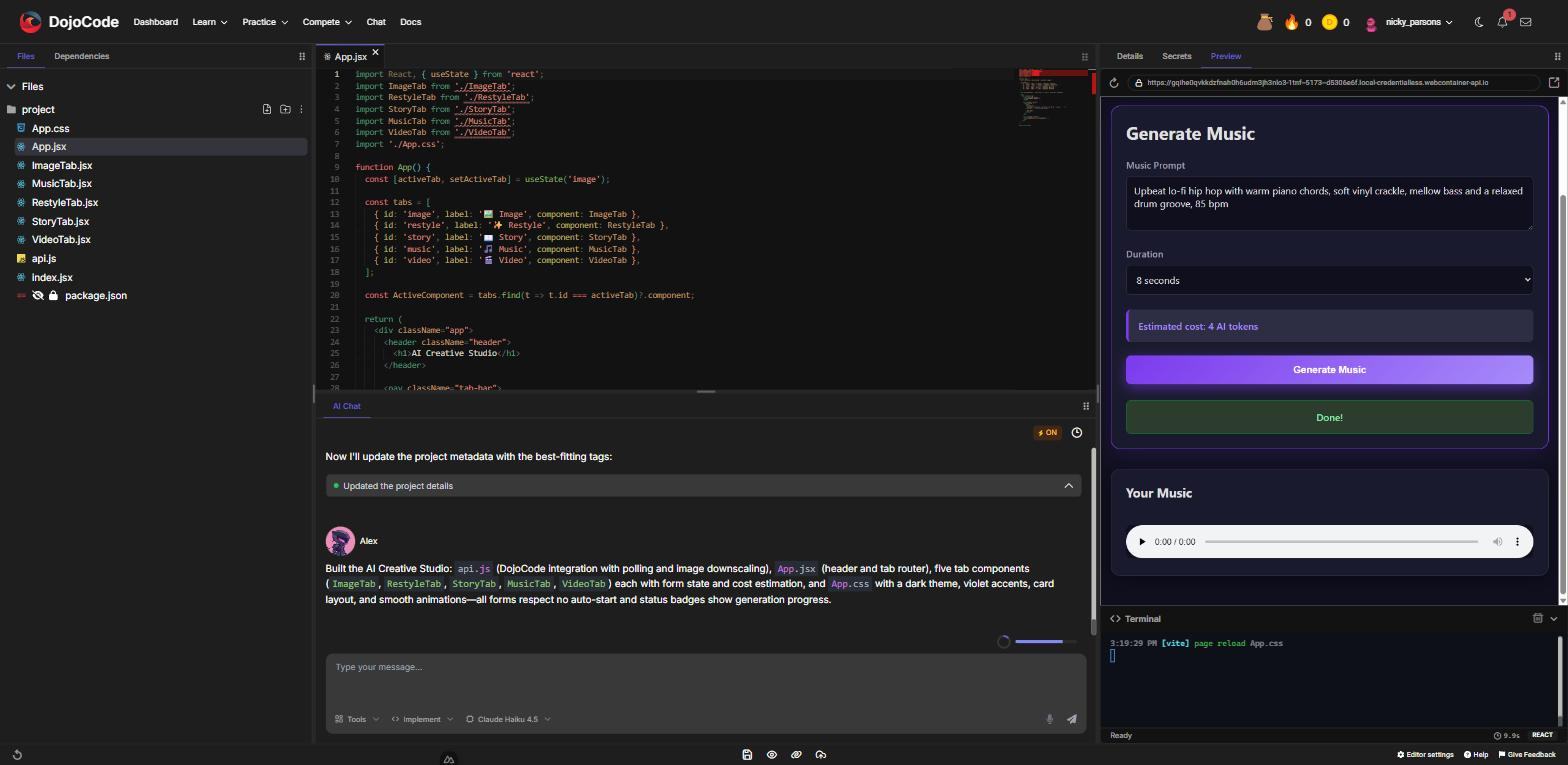
Fig. 4 - Slow modalities such as music show a status while they run, then the result
Ideas to ask for:
- "Add a studio section with a separate form for text-to-video, image-to-video and text-to-music. Show the estimated cost, a status while it runs and a player at the end."
- "Let me upload a photo and grade it from 1 to 10 with a short list of what's good and bad."
- "Generate four sticker designs from my prompt and let me download the one I like."
- "Record my voice, transcribe it and turn it into a to-do list."
- "Write a quiz about the topic I type, returned as JSON, and render it as multiple-choice questions."
Generations only start when you click
The assistant wires every generation to an explicit action (a button, a form submit). The preview reloads your code on every save, so a generation that started on page load would charge you again and again.
Pricing
Each modality has a price in AI tokens per unit. Quantity options multiply the price, and every started unit is charged in full.
| Modality | Charged per | AI tokens |
|---|---|---|
text-to-text | request | 1 |
image-to-text | request | 2 |
speech-to-text | recording | 2 |
text-to-image | image (num_outputs) | 3 |
image-to-image | image (num_outputs) | 5 |
text-to-speech | 1,000 characters of text | 3 |
text-to-music | 10 seconds of music (duration) | 4 |
text-to-video | 97 frames ≈ 4 seconds of video (length) | 12 |
image-to-video | 97 frames ≈ 4 seconds of video (length) | 12 |
Examples:
- 4 images from
text-to-image→ 4 × 3 = 12 tokens - 15 seconds of music → 2 started units × 4 = 8 tokens; 30 seconds → 12 tokens
- A 161-frame video → 2 started units × 12 = 24 tokens; the default 97 frames → 12 tokens
- A 1,500-character narration → 2 started units × 3 = 6 tokens
Good to know:
- Tokens are charged when the generation is submitted. If you don't have enough, the request is refused and nothing is charged.
- Failed generations are refunded automatically. If the model fails, the tokens go back to your balance.
- You are notified every time. After each paid generation a notification tells you how many AI tokens it used (or that they were refunded), and your token balance updates in every open tab.
- The prices reflect what each model really costs to run: a video is far more expensive than a paragraph of text.
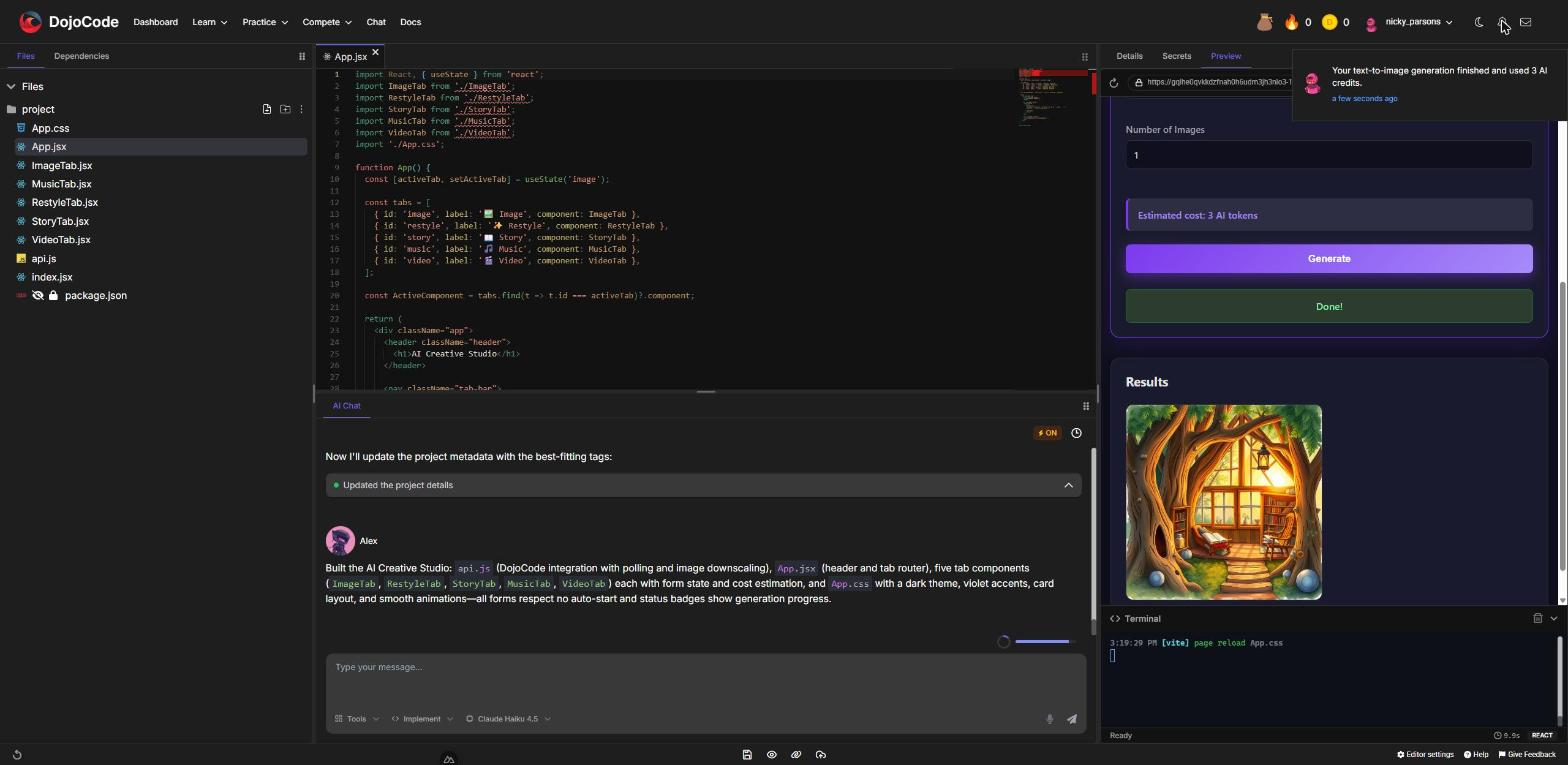
Fig. 5 - A notification after every paid generation
How a generation works
- Fast modalities (
text-to-text,image-to-text,text-to-image,image-to-image,speech-to-text) answer200with the finished result. - Slow modalities (
text-to-video,image-to-video,text-to-music,text-to-speech) answer202right away with a pending record; your code polls it until it is done. The examples on this page do that for you. - Media results are permanent links. Images, videos and audio files are stored by DojoCode, so the URLs in
outputkeep working — use them directly in<img>,<video>or<audio>.
API reference
Credentials
The platform injects two values into your project wherever its code runs — an API URL and an access token for the signed-in user. How you read them depends on the template; see Reading the credentials in each template. Never hardcode either value, and never paste a token into your code.
Every request sends the token in the Authorization header and JSON in the body:
POST {API_URL}/ai-generation/generations
Authorization: Bearer {AI_TOKEN}
Content-Type: application/json

{ "modality": "text-to-image", "input": { "prompt": "a watercolor fox in the snow" } }Endpoints
| Method and path | What it does |
|---|---|
POST /ai-generation/generations | Submits a generation. Body: { modality, input, projectId? }. Optional query ?wait=true or ?wait=false. |
GET /ai-generation/generations/{id} | Reads one of your generations — poll it until it finishes. |
GET /ai-generation/generations?limit=5 | Lists your latest generations, newest first (limit up to 50, optional status filter). |
wait decides whether the POST holds the connection until the result is ready:
- Not set (default): fast modalities wait and answer
200; slow ones answer202immediately. wait=true: hold the request until the result is ready (up to about 90 seconds), then answer200. If the time runs out it still answers202— always handle both.wait=false: answer202immediately, whatever the modality.
projectId is optional: pass your project's id to link the notification you receive to the project.
The generation record
Every endpoint answers with a generation record:
{
  "id": "6aa92938b7c6a66330736b33",
  "status": "succeeded",
  "modality": "text-to-video",
  "model": "lightricks/ltx-video",
  "output": ["https://…/ai-generation-outputs/…/6aa92938b7c6a66330736b33-0.mp4"],
  "outputPersisted": true,
  "error": null,
  "creditsCharged": 12,
  "refunded": false,
  "createdAt": "2026-09-15T11:17:12.898Z",
  "completedAt": "2026-09-15T11:19:01.085Z"
}| Field | Meaning |
|---|---|
status | queued or running while it works; succeeded, failed or cancelled when done. |
output | The result: a string for text, one URL for music and speech, a list of URLs for images and video, an object for transcription. null until it succeeds. |
error | { message } when it failed — show the message to the user. |
creditsCharged | AI tokens charged for this generation. |
refunded | true when a failed generation gave the tokens back. |
outputPersisted | true when the media was copied to DojoCode storage (permanent links). |
Errors
Errors come back as { name, httpCode, errors: [{ message }] }. Show errors[0].message — it explains what went wrong in plain language.
| HTTP status | What it means | What to do |
|---|---|---|
400 / 422 | The input is invalid (missing field, value out of range, file too big), or too many requests in a short time; the message says which | Fix the request, or wait a few minutes and retry; nothing was charged |
401 | The token is missing or expired | Reload the editor or preview to get a fresh session |
403 | No active premium subscription, or not enough AI tokens | Upgrade or wait for your tokens to refresh |
404 | That generation does not exist or isn't yours | Check the id |
5xx | The AI provider had a problem | Retry later |
A record with status: "failed" carries error.message and refunded: true — the tokens are already back in your balance.
Limits
- 30 new generations per 10 minutes per user, and 600 status reads per 10 minutes (plenty for polling every 2 seconds).
- Prompts up to 4,000 characters;
text-to-speechtext up to 4,000 characters. - Image inputs up to 5 MB, audio inputs up to 10 MB, sent as an
httpsURL or a base64 data URI in the JSON body (no multipart uploads). - A generation that hasn't finished after 15 minutes is cancelled and refunded.
Inputs for each modality
* marks required fields. Everything else is optional.
| Modality | Input fields | Output |
|---|---|---|
text-to-text | prompt*, system_prompt, max_tokens (1–4096), temperature (0–2) | string |
image-to-text | prompt*, image* | string |
text-to-image | prompt*, aspect_ratio, num_outputs (1–4), output_format (webp, jpg, png), output_quality (1–100), seed | list of image URLs |
image-to-image | prompt*, image*, prompt_strength (0–1), guidance (0–10), num_inference_steps (1–50), plus the text-to-image options | list of image URLs |
text-to-video | prompt*, negative_prompt, aspect_ratio, length (9–257 frames, default 97), steps (1–50), cfg (1–20), seed | list of video URLs (MP4) |
image-to-video | prompt*, image* (the first frame), plus the text-to-video options | list of video URLs (MP4) |
text-to-music | prompt*, duration (1–30 seconds, default 8), output_format (mp3, wav), input_audio (a melody to follow), seed | one audio URL |
text-to-speech | text*, speaker_reference (10–30 s voice sample), text_reference (the words spoken in the sample) | one audio URL |
speech-to-text | audio*, language (a language code or auto), translate (to English), transcription (plain text, srt, vtt) | { transcription, detected_language, translation, segments } |
aspect_ratio accepts 1:1, 16:9, 21:9, 3:2, 2:3, 4:5, 5:4, 3:4, 4:3, 9:16 and 9:21.
{
  "modality": "text-to-text",
  "input": {
    "prompt": "Write three quiz questions about the solar system as JSON.",
    "system_prompt": "You are a friendly science teacher.",
    "max_tokens": 400,
    "temperature": 0.7
  }
}{
"modality": "image-to-text",
"input": {
"prompt": "Grade this food plating from 1 to 10 and list what could be better.",
"image": "data:image/jpeg;base64,/9j/4AAQSkZJRg…"
}
}{
"modality": "text-to-image",
"input": {
"prompt": "A cozy reading nook in a treehouse, warm evening light, watercolor",
"aspect_ratio": "16:9",
"num_outputs": 2,
"output_format": "webp"
}
}{
"modality": "image-to-image",
"input": {
"prompt": "Turn this photo into a Studio Ghibli style painting",
"image": "https://example.com/my-photo.jpg",
"prompt_strength": 0.6
}
}{
"modality": "text-to-video",
"input": {
"prompt": "A slow cinematic drone shot over a misty pine forest at sunrise, golden light breaking through the fog, birds flying across the frame",
"aspect_ratio": "16:9",
"length": 97
}
}{
"modality": "image-to-video",
"input": {
"prompt": "The waves roll gently onto the beach while clouds drift across the sky",
"image": "https://example.com/beach.jpg"
}
}{
"modality": "text-to-music",
"input": {
"prompt": "Upbeat lo-fi hip hop with warm piano chords, soft vinyl crackle and a relaxed drum groove, 85 bpm",
"duration": 15,
"output_format": "mp3"
}
}{
"modality": "text-to-speech",
"input": {
"text": "Welcome to my portfolio! Let me show you around.",
"speaker_reference": "data:audio/webm;base64,GkXfo59ChoEBQveBAULygQRC…",
"text_reference": "The exact words I said in the voice sample."
}
}{
"modality": "speech-to-text",
"input": {
"audio": "data:audio/webm;base64,GkXfo59ChoEBQveBAULygQRC…",
"language": "auto",
"transcription": "plain text"
}
}Better prompts, better results
Video models need long, descriptive prompts — describe the subject, the motion, the camera and the light. For text-to-text, ask for JSON when you want structured data, then parse it defensively (the model may wrap it in a code fence).
Media inputs
Fields such as image, audio, input_audio and speaker_reference accept an https URL or a base64 data URI. In the browser, turn a picked file or a recording into a data URI first:
/** Downscale a picked image to at most 1024 px and return a JPEG data URI (stays under the 5 MB limit). */
export function imageToDataUri(file, maxSide = 1024) {
  return new Promise((resolve, reject) => {
    const img = document.createElement('img');
    img.onload = () => {
      const scale = Math.min(1, maxSide / Math.max(img.width, img.height));
      const canvas = document.createElement('canvas');
      canvas.width = Math.round(img.width * scale);
      canvas.height = Math.round(img.height * scale);
      canvas.getContext('2d').drawImage(img, 0, 0, canvas.width, canvas.height);
      URL.revokeObjectURL(img.src);
      resolve(canvas.toDataURL('image/jpeg', 0.8));
    };
    img.onerror = reject;
    img.src = URL.createObjectURL(file);
  });
}

/** Turn a Blob (for example a MediaRecorder recording) into a data URI. */
export function blobToDataUri(blob) {
  return new Promise((resolve, reject) => {
    const reader = new FileReader();
    reader.onload = () => resolve(reader.result);
    reader.onerror = reject;
    reader.readAsDataURL(blob);
  });
}Letting the user pick an audio file always works:
// <input type="file" id="recording" accept="audio/*">
const file = document.querySelector('#recording').files[0];
const result = await generate('speech-to-text', { audio: await blobToDataUri(file) });
console.log(result.transcription);Recording from the microphone for speech-to-text (or a voice sample for text-to-speech):
Microphone access in the preview
The preview panel inside the editor has no microphone access. Open the preview in its own browser tab (the ↗ button in the preview's address bar) to record, or offer a file picker as shown above.
const stream = await navigator.mediaDevices.getUserMedia({ audio: true });
const recorder = new MediaRecorder(stream, { mimeType: 'audio/webm' });
const chunks = [];

recorder.ondataavailable = (event) => chunks.push(event.data);
recorder.onstop = async () => {
  stream.getTracks().forEach((track) => track.stop());
  const audio = await blobToDataUri(new Blob(chunks, { type: 'audio/webm' }));
  const result = await generate('speech-to-text', { audio });
  console.log(result.transcription);
};

recorder.start();
// …and when the user clicks "Stop":
recorder.stop();Voice cloning needs a sample
text-to-speech speaks in the voice of the sample you send: include speaker_reference (a clear 10–30 second recording) and text_reference (exactly what is said in that recording). Only clone voices you have the right to use.
Reading the credentials in each template
| Template | API URL | Access token |
|---|---|---|
| React, React TS, Vue, Vue TS, Svelte, SvelteKit, SolidJS, Vanilla JS/TS, Remix, React Native | import.meta.env.VITE_DOJOCODE_API_URL | import.meta.env.VITE_DOJOCODE_AI_TOKEN |
| Next.js, Next.js TS | process.env.NEXT_PUBLIC_DOJOCODE_API_URL | process.env.NEXT_PUBLIC_DOJOCODE_AI_TOKEN |
| Astro, Astro TS | import.meta.env.PUBLIC_DOJOCODE_API_URL | import.meta.env.PUBLIC_DOJOCODE_AI_TOKEN |
| Angular | DOJOCODE_ENV['DOJOCODE_API_URL'] from ./dojocode-env | DOJOCODE_ENV['DOJOCODE_AI_TOKEN'] |
| NestJS, Fastify, Hono, Node.js (preview) | process.env.DOJOCODE_API_URL | process.env.DOJOCODE_AI_TOKEN |
| Python with the browser preview | the dojocode_ai module (or os.environ["DOJOCODE_API_URL"]) | handled by the module (or os.environ["DOJOCODE_AI_TOKEN"]) |
| Run templates: Python, Node.js, TypeScript, Java, Go, C#, PHP, Ruby, Rust | environment variable DOJOCODE_API_URL | environment variable DOJOCODE_AI_TOKEN |
- Each framework exposes a different prefix to browser code. The wrong one is simply
undefined, with no error — use exactly the name in the table. - In browser templates the API URL can be a same-origin proxy path (such as
/dojocode-api) or a full URL. Always read it from the variable. - Angular:
dojocode-env.tsis created by the platform next toapp.component.tsand is hidden from the file tree — just import it. - Run templates also receive
DOJOCODE_PROJECT_ID. - There is no
.envfile to create and no package to install.
Code examples for each template
Every template reads the connection its own way (see the table above), and all examples follow the same pattern: a small generate() helper that submits the request, handles both 200 and 202, polls every 2 seconds and returns the output — called from a button click.
A complete example for every template
AI SDK examples by template has a copy-paste example for each template: React, React TS, Vue, Vue TS, Svelte, SvelteKit, SolidJS, Vanilla JS/TS, Remix, React Native, Next.js, Astro, Angular, NestJS, Fastify, Hono, Node.js, Python (browser preview and Run), Java, Go, C#, PHP, Ruby and Rust.
The generate() helper
The helper for the Vite templates (React, Vue, Svelte, SolidJS, Vanilla, Remix, React Native). In other templates only the first two lines change — read the URL and the token with the names from the table above.
const API_URL = import.meta.env.VITE_DOJOCODE_API_URL;
const API_TOKEN = import.meta.env.VITE_DOJOCODE_AI_TOKEN;
const FINISHED = ['succeeded', 'failed', 'cancelled'];

async function request(path, options = {}) {
  const response = await fetch(`${API_URL}${path}`, {
    ...options,
    headers: { 'Content-Type': 'application/json', Authorization: `Bearer ${API_TOKEN}` }
  });
  const data = await response.json().catch(() => null);
  if (!response.ok) throw new Error(data?.errors?.[0]?.message ?? `Request failed (${response.status})`);
  return data;
}

/** Submit a generation and resolve with its output (handles 200 and 202). */
export async function generate(modality, input) {
  let record = await request('/ai-generation/generations', {
    method: 'POST',
    body: JSON.stringify({ modality, input })
  });
  while (!FINISHED.includes(record.status)) {
    await new Promise((resolve) => setTimeout(resolve, 2000));
    record = await request(`/ai-generation/generations/${record.id}`);
  }
  if (record.status !== 'succeeded') throw new Error(record.error?.message ?? 'The generation failed.');
  return record.output;
}// In a click handler:
const [imageUrl] = await generate('text-to-image', { prompt: 'a watercolor fox in the snow' });Python in the browser: the dojocode_ai module
Python projects with the browser preview get a ready-made module instead of HTTP code:
| Function | What it does |
|---|---|
await generate_async(modality, input, wait=True, timeout=150) | Submits a generation and returns the finished record (a dict). With wait=False it returns the pending record right away. |
await get_async(generation_id) | Reads a generation record. |
generate(…), get(…), list_generations(…) | Synchronous versions for plain scripts. They freeze the page while they wait, so generate() waits at most 20 seconds and then raises DojoCodeAiError with the generation id — collect it later with get(id), or use the async pair. |
DojoCodeAiError | Raised with the API's message (not enough tokens, invalid input, failed generation…). |
The raw values are also in os.environ["DOJOCODE_API_URL"] and os.environ["DOJOCODE_AI_TOKEN"].
The module is installed at the project root, so dojocode_ai.py is a reserved file name there and the editor refuses to create one.
Run templates and the 20-second rule
Templates without a preview (Python, Node.js, Java, Go, C#, PHP, Ruby, Rust) run your program in a container when you press Run, with DOJOCODE_API_URL, DOJOCODE_AI_TOKEN and DOJOCODE_PROJECT_ID as ordinary environment variables.
The 20-second rule
A Run stops after 20 seconds. Fast modalities (text, images, transcription) finish in time — use a 15-second client timeout. For video, music and speech, submit with ?wait=false, poll for up to ~10 seconds, print the generation id, and read the result on the next Run with GET /ai-generation/generations/{id} (or ?limit=1 for your latest).
C and C++
C and C++ projects can't call the SDK yet: their Run environment has no built-in HTTPS client. Build AI features with one of the other templates.
Publishing projects that use the SDK
A project whose code calls the SDK can be published to a public *.dojocode.net site with the same code. The published site gets its own access token in the variables your code already reads (for example VITE_DOJOCODE_AI_TOKEN or process.env.DOJOCODE_AI_TOKEN), and the API URL points at the public DojoCode API.
- You pay for your visitors. Every generation a visitor starts on the published site is charged to the AI tokens of whoever published it, at the usual prices. The Publish dialog warns you about it before you publish. Failed generations are still refunded, but visitors' generations don't send you a notification each.
- Visitors can read the token. Wherever client-side code reads it — React, Vue, Angular, Python in the browser and the other browser templates, and the client side of Next.js, SvelteKit, Remix and Astro — the token is part of the published page: anyone can read it and spend your AI tokens elsewhere. Only code that runs on the server (Node.js servers, Python APIs, server routes) keeps it out of the page.
- Unpublishing revokes the token. Copies saved from the old page stop working right away; publishing again issues a new token.
- Republish after adding AI calls. The token is built into the site, so a site published before your code called the SDK doesn't have one.
- Listing returns nothing on a published site. All visitors share one token, so
GET /ai-generation/generationsis always empty there. Keep theidof each generation you start and pollGET /ai-generation/generations/{id}. - Each visitor has their own rate limit, and the publisher needs an active subscription, as in the editor.
Troubleshooting
| Symptom | Fix |
|---|---|
The URL or token is undefined / "credentials not available" | Use exactly the variable name for your template (see the table above); browser frameworks each use a different prefix. |
401 after the editor was open for a long time | The session expired — reload the editor (or the preview) and try again. |
403 "not enough AI tokens" | Wait for your AI tokens to refresh, or use a cheaper option (fewer images, a shorter clip). |
A published site gets 403 | The AI tokens of whoever published it ran out, or their subscription is no longer active. |
A video or speech generation stays in queued/running | Slow models can take a few minutes on a cold start. Keep polling; after 15 minutes it is cancelled and refunded automatically. |
| Tokens are charged every time I save | Your code starts a generation on page load (for example in useEffect). Start generations from a button click instead. |
| A Run ends with no result | Runs stop after 20 seconds. Submit slow modalities with ?wait=false, print the id and read it back on the next Run. |
| Java: "header parser received no bytes" | Build the client with HttpClient.Version.HTTP_1_1, as in the example. |
| Recording fails with a permission error | The editor's preview panel has no microphone access — open the preview in its own tab, or upload an audio file instead. |