
Databases
Building a backend that needs to store something? Every real app eventually does - todos, users, scores. Databases give you a small managed PostgreSQL database that lives on DojoCode: create it in one click, browse and query it in a built-in data editor, and connect to it from your projects the same way you would in production - through an environment variable.
Real Postgres, zero setup
Each database is a real PostgreSQL database with its own generated credentials and an isolated role - no other user can connect to it. You don't install anything, and you can also connect from your own machine with any Postgres client.
Creating a database
Head to My Databases and click New database. Pick a display name (the actual Postgres database name and credentials are generated for you) - provisioning is instant.
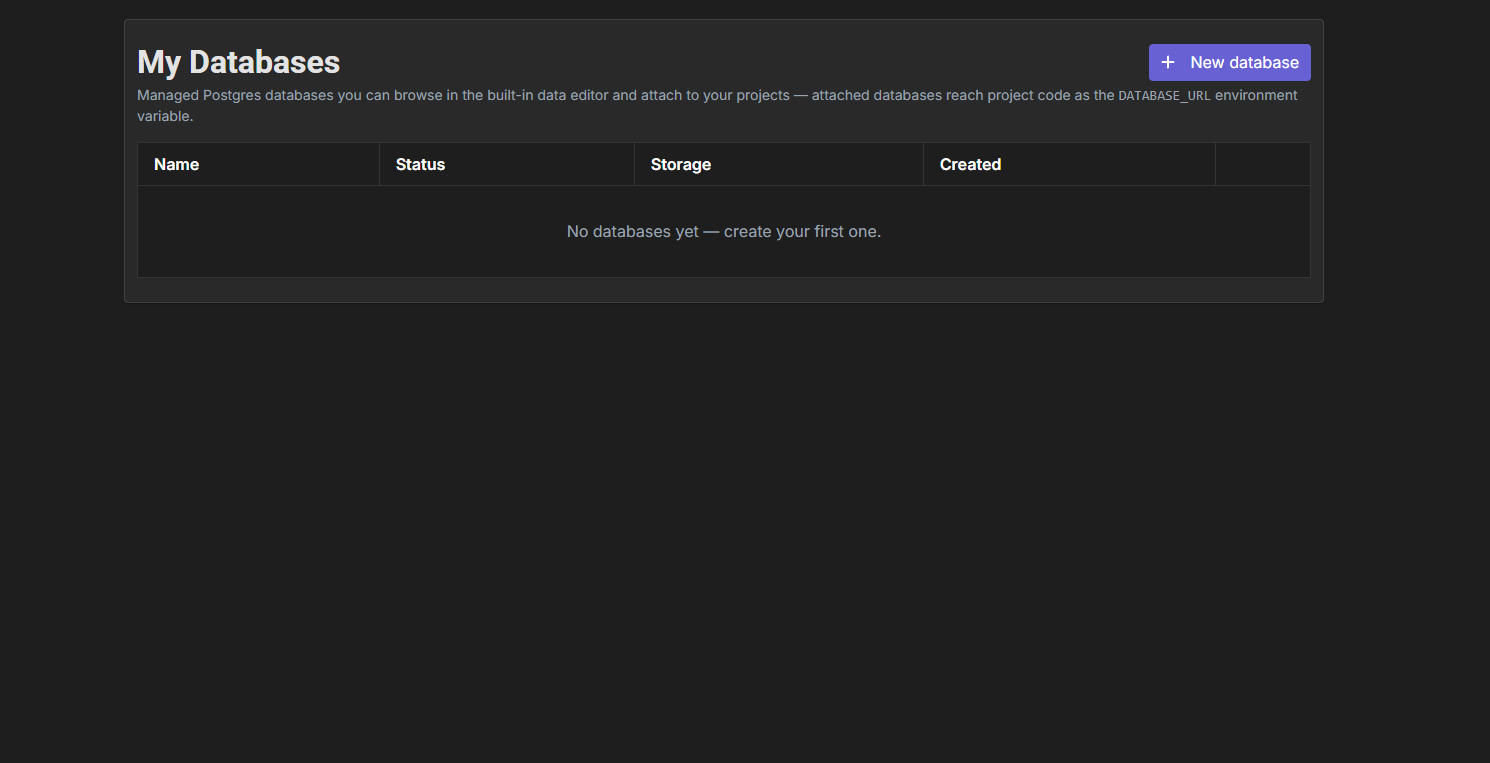
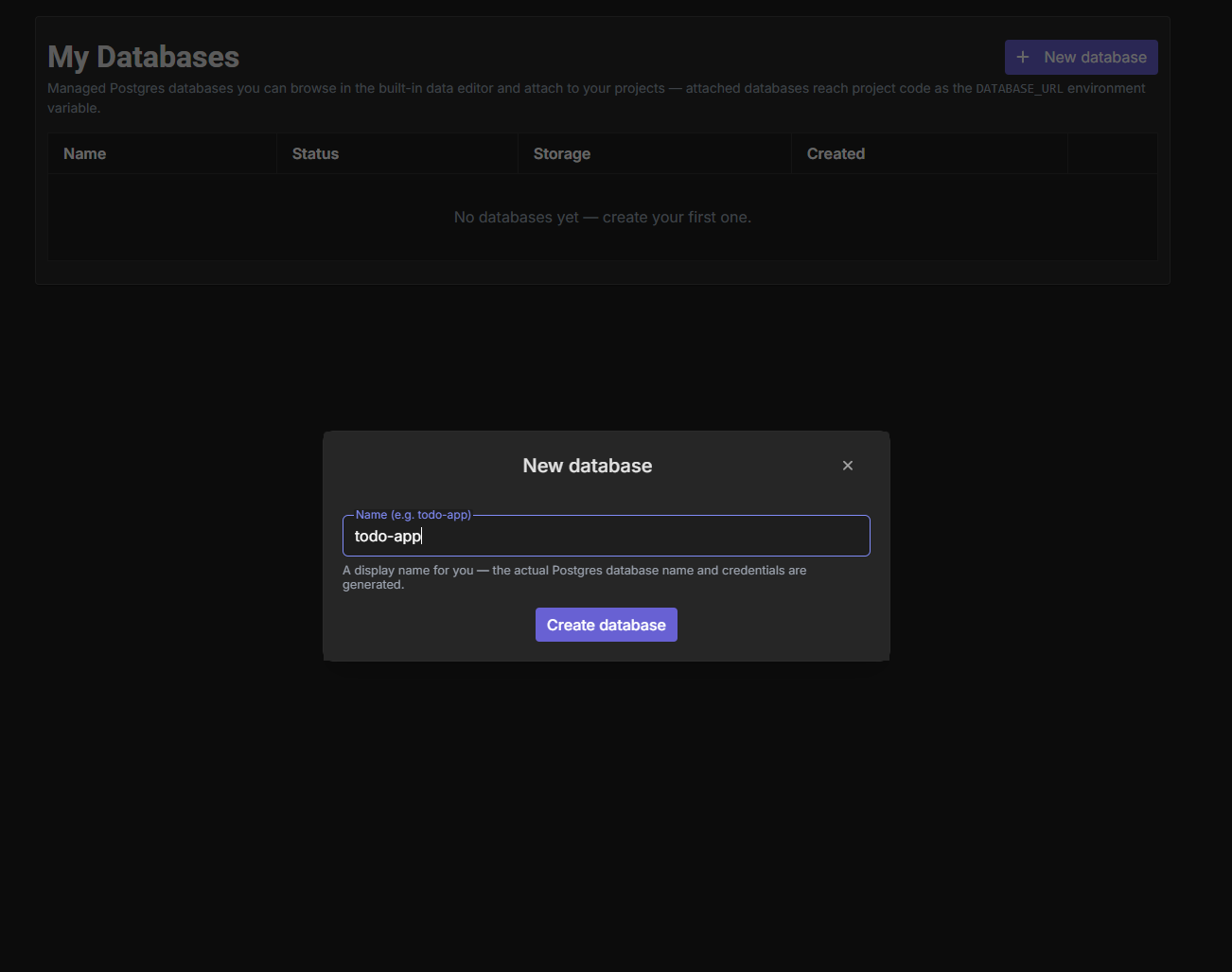
Each database shows its status, storage usage against the quota, and actions to open the data editor or delete it.
Deleting is permanent
Deleting a database drops it from the cluster with all of its data, and any project using it loses the connection. There is no undo.
The data editor
Open a database to land in its data editor - a full-width workspace with two tabs:
- Query - a SQL editor (with syntax highlighting and Ctrl/⌘ + Enter to run) that executes against your database. Multi-statement scripts are supported; results, row counts and timings show below.
- Tables - a live view of your schema: every table with its columns and types, plus a one-click Preview that runs a
SELECT * … LIMIT 20for you.
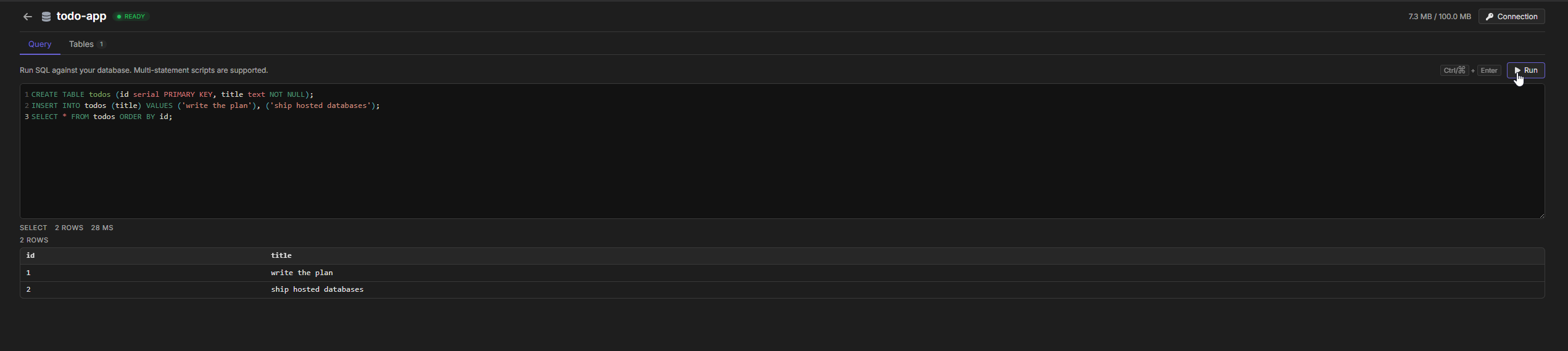
Clicking a table in the Tables tab drops a ready SELECT into the editor, so browsing existing data takes no typing:
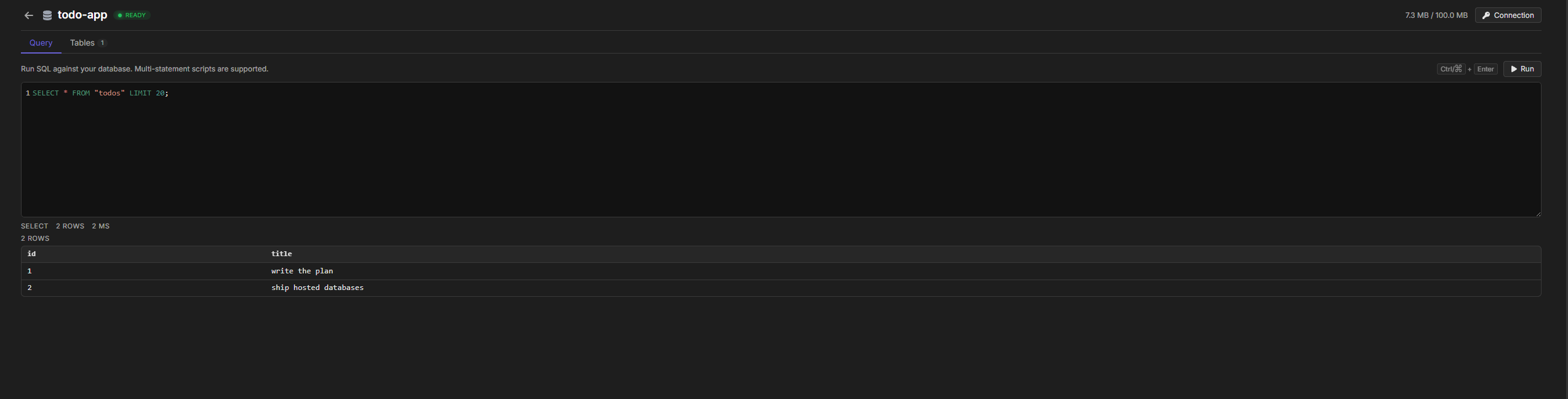
Queries run as your database's own isolated role, with a statement timeout and a result cap - long-running or runaway queries are stopped automatically.
A multi-statement script runs as one transaction: if any statement fails, the whole script is rolled back and nothing is left half-applied. Statements that Postgres refuses to run inside a transaction (VACUUM, CREATE INDEX CONCURRENTLY) still work when you run them on their own.
Connection details
The Connection panel shows everything a Postgres client needs: host, port, database, user, password and a ready-to-paste postgres:// URL - each with one-click copy. The password and URL are masked until you reveal them, and they are only fetched when you ask.

- Only you can see the password. It exists in exactly one place - this panel, on your own database. It is never shown to other users or to the AI assistant.
- Rotate any time. Rotate password generates a new one and disconnects every client using the old one. Projects with the database attached pick the new password up automatically on their next run, and any published site using it is updated in place - no republish needed.
- Connect from anywhere. The connection string works from your own laptop too -
psql, TablePlus, DBeaver, or any Postgres driver.
Using a database in a project
Server-side project templates have a Database tab next to Secrets. Attach one of your databases there and the runtime injects the connection as environment variables:
| Variable | Value |
|---|---|
DATABASE_URL | Full postgres://user:password@host:port/db connection string |
DATABASE_HOST / DATABASE_PORT | Host and port |
DATABASE_NAME / DATABASE_USER / DATABASE_PASSWORD | Individual pieces |
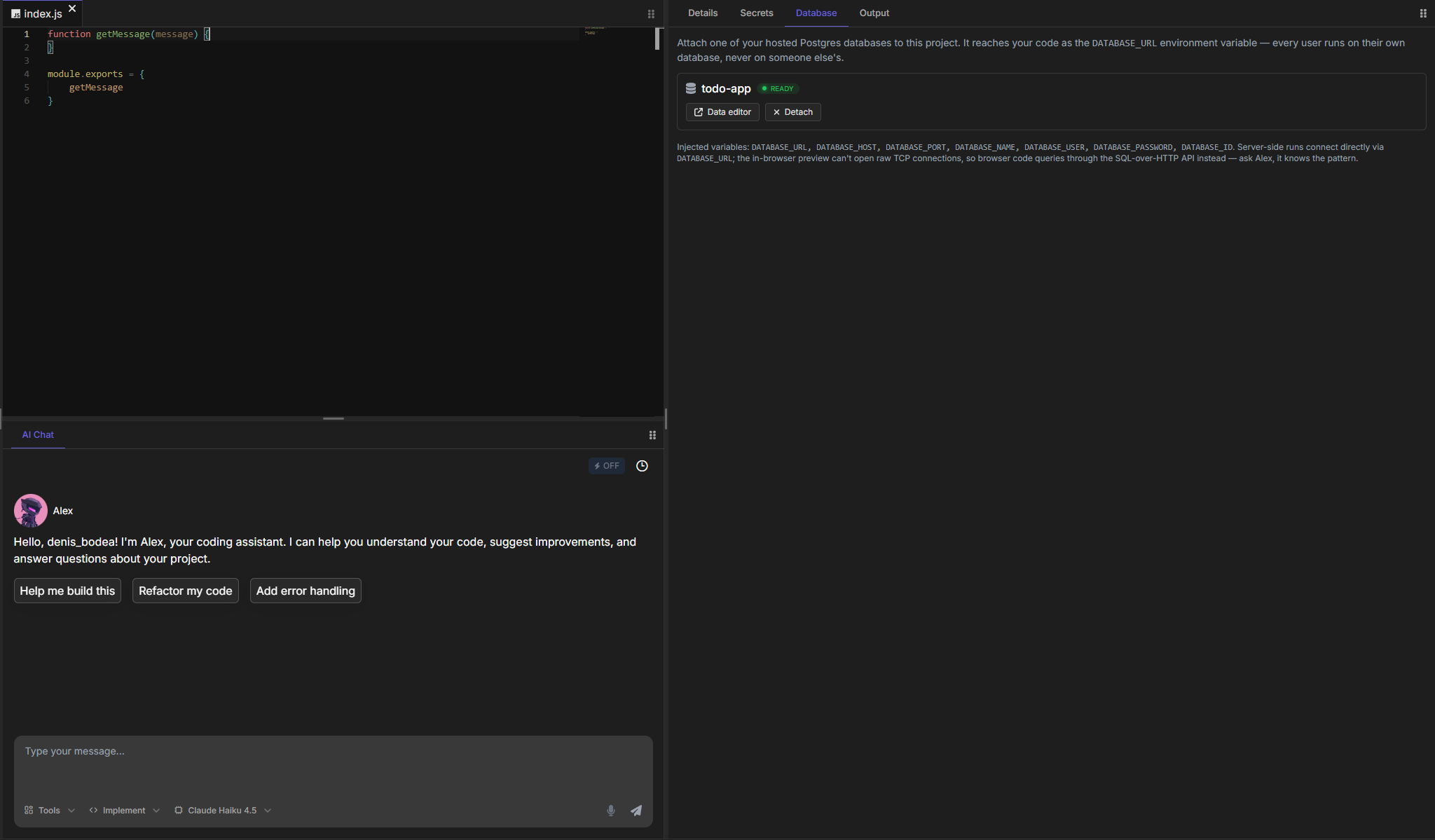
The variables are injected through the same pipeline as secrets, so the reading mechanism is the one your template already uses for secrets - process.env.NAME in Node templates, os.environ["NAME"] in Python, and so on (see the full per-template table). An explicit secret named DATABASE_URL overrides the attached database's value.
Server-side templates only
The Database tab appears on NodeJS, NodeTS, NestJS, Fastify, Hono, Python, PHP, Java, C, C++, Ruby, Rust, C# and Go. Frontend, full-stack, mobile and SQL-playground templates run entirely in the in-browser preview, which has no TCP socket to reach Postgres with - so they have no Database tab. To put a database behind a browser app, build the API in one of the server templates above and call it from the frontend.
Backend JavaScript templates
NodeJS, NodeTS, Fastify, Hono and NestJS run through the Run button, so they connect for real. Add the pg package in the Dependencies panel first. All examples assume the attached database has the todos table from the data editor section.
The editor preview and API tester reach it too
The in-browser preview has no TCP sockets, so DojoCode answers require("pg") there with a built-in stand-in: your code works unchanged, and each query is relayed through DojoCode to your own attached database. It covers the everyday API (Pool, Client, query with $n placeholders, callbacks or promises); each statement runs as its own transaction, so a multi-statement BEGIN/COMMIT flow needs Run or the published app, which use the real driver.
const { Client } = require("pg");

async function main() {
  if (!process.env.DATABASE_URL) {
    console.log("No database attached - attach one in the Database panel.");
    return;
  }

  const client = new Client({ connectionString: process.env.DATABASE_URL });
  await client.connect();
  const { rows } = await client.query("SELECT * FROM todos ORDER BY id");
  console.log(rows);
  await client.end();
}

main().catch((error) => console.error("Database error:", error.message));const Fastify = require("fastify");
const { Pool } = require("pg");
const app = Fastify();
const pool = process.env.DATABASE_URL
? new Pool({ connectionString: process.env.DATABASE_URL })
: null;
app.get("/todos", async () => {
if (!pool) return { error: "No database attached." };
const { rows } = await pool.query("SELECT * FROM todos ORDER BY id");
return rows;
});
app.listen({ port: 3000, host: "0.0.0.0" });const { Hono } = require("hono");
const { Pool } = require("pg");
const app = new Hono();
const pool = process.env.DATABASE_URL
? new Pool({ connectionString: process.env.DATABASE_URL })
: null;
app.get("/todos", async (context) => {
if (!pool) return context.json({ error: "No database attached." });
const { rows } = await pool.query("SELECT * FROM todos ORDER BY id");
return context.json(rows);
});
module.exports = app;// todos.service.ts
import { Injectable } from "@nestjs/common";
import { Pool } from "pg";
@Injectable()
export class TodosService {
private readonly pool = process.env.DATABASE_URL
? new Pool({ connectionString: process.env.DATABASE_URL })
: null;
async findAll() {
if (!this.pool) return { error: "No database attached." };
const { rows } = await this.pool.query("SELECT * FROM todos ORDER BY id");
return rows;
}
}Python
Runs through the Run button too. Add psycopg2-binary in the Dependencies panel:
import os
import psycopg2

url = os.environ.get("DATABASE_URL")
if not url:
    print("No database attached - attach one in the Database panel.")
else:
    connection = psycopg2.connect(url)
    with connection.cursor() as cursor:
        cursor.execute("SELECT * FROM todos ORDER BY id")
        for row in cursor.fetchall():
            print(row)
connection.close()The browser preview reaches it too
Python projects can also switch on the web preview and the API tester, which run your code in the browser through WebAssembly. That runtime has no TCP socket, so DojoCode ships a built-in stand-in for psycopg2 there: your import psycopg2 code works unchanged, and each query is relayed through DojoCode to your own attached database. The preview's terminal may note that psycopg2-binary has no browser build - that's expected; the dependency is for Run and the published app, and the preview uses the stand-in whenever a database is attached.
The relay covers the everyday query patterns (connect, cursor, execute with %s placeholders, fetches, RealDictCursor); each statement runs as its own transaction, so commit and rollback are accepted no-ops. The Run button and the published project connect directly with the real driver instead.
Compiled & other languages
Ruby, Go, Rust, PHP, Java, C#, C and C++ also run through the Run button, so the connection variables are present in the run environment. Each one needs its Postgres driver added in the Dependencies panel first - the driver is named above every example below.
Most drivers take the ready-made DATABASE_URL. Java's JDBC and C#'s Npgsql use their own connection-string formats instead, so those two build the string from the separate DATABASE_HOST / DATABASE_PORT / DATABASE_NAME / DATABASE_USER / DATABASE_PASSWORD variables.
require 'pg'

url = ENV['DATABASE_URL'].to_s
if url.empty?
  puts 'No database attached - attach one in the Database panel.'
else
  conn = PG.connect(url)
  conn.exec('SELECT id, title FROM todos ORDER BY id') do |rows|
    rows.each { |row| puts "##{row['id']} - #{row['title']}" }
  end
  conn.close
endpackage main
import (
"database/sql"
"fmt"
"os"
_ "github.com/lib/pq"
)
func main() {
url := os.Getenv("DATABASE_URL")
if url == "" {
fmt.Println("No database attached - attach one in the Database panel.")
return
}
db, err := sql.Open("postgres", url)
if err != nil {
fmt.Println("open error:", err)
return
}
defer db.Close()
rows, err := db.Query("SELECT id, title FROM todos ORDER BY id")
if err != nil {
fmt.Println("query error:", err)
return
}
defer rows.Close()
for rows.Next() {
var id int
var title string
rows.Scan(&id, &title)
fmt.Printf("#%d - %s\n", id, title)
}
}use native_tls::TlsConnector;
use postgres::Client;
use postgres_native_tls::MakeTlsConnector;
use std::env;
fn main() {
let url = env::var("DATABASE_URL").unwrap_or_default();
if url.is_empty() {
println!("No database attached - attach one in the Database panel.");
return;
}
// The database accepts only encrypted connections, so `NoTls` cannot connect.
let connector = MakeTlsConnector::new(TlsConnector::new().expect("tls setup failed"));
let mut client = Client::connect(&url, connector).expect("connection failed");
for row in client
.query("SELECT id, title FROM todos ORDER BY id", &[])
.expect("query failed")
{
let id: i32 = row.get(0);
let title: String = row.get(1);
println!("#{} - {}", id, title);
}
}<?php
$url = getenv('DATABASE_URL');
if ($url === false || $url === '') {
echo "No database attached - attach one in the Database panel.\n";
return;
}
$conn = pg_connect($url);
$result = pg_query($conn, 'SELECT id, title FROM todos ORDER BY id');
while ($row = pg_fetch_assoc($result)) {
echo '#' . $row['id'] . ' - ' . $row['title'] . "\n";
}
pg_close($conn);import java.sql.*;
public class HelloWorld {
public static void main(String[] args) throws Exception {
String host = System.getenv("DATABASE_HOST");
if (host == null || host.isEmpty()) {
System.out.println("No database attached - attach one in the Database panel.");
return;
}
// JDBC has its own URL format - build it from the separate variables.
String jdbcUrl = "jdbc:postgresql://" + host + ":" + System.getenv("DATABASE_PORT")
+ "/" + System.getenv("DATABASE_NAME");
try (Connection conn = DriverManager.getConnection(
jdbcUrl, System.getenv("DATABASE_USER"), System.getenv("DATABASE_PASSWORD"));
Statement st = conn.createStatement();
ResultSet rs = st.executeQuery("SELECT id, title FROM todos ORDER BY id")) {
while (rs.next()) {
System.out.println("#" + rs.getInt("id") + " - " + rs.getString("title"));
}
}
}
}using System;
using Npgsql;
var host = Environment.GetEnvironmentVariable("DATABASE_HOST");
if (string.IsNullOrEmpty(host))
{
Console.WriteLine("No database attached - attach one in the Database panel.");
return;
}
// Npgsql uses key/value connection strings, not the DATABASE_URL format.
var connString =
$"Host={host};Port={Environment.GetEnvironmentVariable("DATABASE_PORT")};" +
$"Database={Environment.GetEnvironmentVariable("DATABASE_NAME")};" +
$"Username={Environment.GetEnvironmentVariable("DATABASE_USER")};" +
$"Password={Environment.GetEnvironmentVariable("DATABASE_PASSWORD")}";
using var conn = new NpgsqlConnection(connString);
conn.Open();
using var cmd = new NpgsqlCommand("SELECT id, title FROM todos ORDER BY id", conn);
using var reader = cmd.ExecuteReader();
while (reader.Read())
{
Console.WriteLine($"#{reader.GetInt32(0)} - {reader.GetString(1)}");
}#include <stdio.h>
#include <stdlib.h>
#include <libpq-fe.h>
int main() {
const char *url = getenv("DATABASE_URL");
if (url == NULL || url[0] == '\0') {
printf("No database attached - attach one in the Database panel.\n");
return 0;
}
PGconn *conn = PQconnectdb(url);
if (PQstatus(conn) != CONNECTION_OK) {
printf("connection error: %s\n", PQerrorMessage(conn));
PQfinish(conn);
return 1;
}
PGresult *res = PQexec(conn, "SELECT id, title FROM todos ORDER BY id");
if (PQresultStatus(res) != PGRES_TUPLES_OK) {
printf("query error: %s\n", PQerrorMessage(conn));
} else {
for (int i = 0; i < PQntuples(res); i++) {
printf("#%s - %s\n", PQgetvalue(res, i, 0), PQgetvalue(res, i, 1));
}
}
PQclear(res);
PQfinish(conn);
return 0;
}#include <cstdlib>
#include <iostream>
#include <string>
#include <libpq-fe.h>
int main() {
const char *url = std::getenv("DATABASE_URL");
if (url == nullptr || url[0] == '\0') {
std::cout << "No database attached - attach one in the Database panel.\n";
return 0;
}
PGconn *conn = PQconnectdb(url);
if (PQstatus(conn) != CONNECTION_OK) {
std::cout << "connection error: " << PQerrorMessage(conn) << "\n";
PQfinish(conn);
return 1;
}
PGresult *res = PQexec(conn, "SELECT id, title FROM todos ORDER BY id");
if (PQresultStatus(res) != PGRES_TUPLES_OK) {
std::cout << "query error: " << PQerrorMessage(conn) << "\n";
} else {
for (int i = 0; i < PQntuples(res); i++) {
std::cout << "#" << PQgetvalue(res, i, 0)
<< " - " << PQgetvalue(res, i, 1) << "\n";
}
}
PQclear(res);
PQfinish(conn);
return 0;
}C and C++ share the same libpq package and the same C API - the difference is only in how you write it: printf and getenv in C, std::cout and std::getenv in C++.
Everyone brings their own database
Attachment is per user, per project - exactly like secrets. When someone else opens (or forks) your project, they don't get your database: they attach one of their own in the same Database tab. Your data and credentials are never shared.
Databases and publishing
An attached database does not stop you from publishing - the DATABASE_* values are runtime environment variables, never baked into the published bundle. Neither do secrets: a server app keeps them on the server as well.
Publish a server app (NestJS, Fastify, Hono, or a Python project with the API tester on) with a database attached and its container boots with the same DATABASE_* variables the editor gives you - the live site talks to a real database, so the code you tested with Run is the code that ships.
In the editor, Python and the Node backends query the database through DojoCode's relay (see their sections above); the published container is where your code first talks to Postgres directly, over a real socket with the real driver.
Two things to know about the published app:
- It runs on your database. A published site is one shared instance, so every visitor's request hits the owner's attached database - unlike the editor, where each person runs on their own. Don't publish an app that lets visitors write data you'd rather keep clean - and remember that anyone with the link can add data through it and fill up your storage quota. The Publish dialog reminds you of this, so be careful who you share the link with.
- Changes reach it without republishing. Attaching, detaching or rotating the password updates the live site too - the next request starts a fresh container carrying the new values, so allow a moment for that first request while it boots.
Databases and Alex (the AI assistant)
Alex knows whether the project has a database attached and what it's called - never the password. It can list your databases, inspect their tables and columns, and write code that reads DATABASE_URL correctly for your template, guards for a missing attachment, and matches your real schema instead of guessing. Connection details it retrieves are always redacted; credentials only ever reach your code through the runtime environment.
Limits and good to know
- Up to 3 databases per account, with a 50 MB storage quota each (soft - past a hard ceiling, only read queries are accepted until you free space).
- A brand-new database is not 0 bytes. Postgres ships every database with its own system catalogs, so an empty one already reports around 7 MB of the quota before you create a single table - that is the floor, not a leak, and it leaves you the rest to work with.
- Database names are display names only; the real Postgres identifiers and credentials are generated and never contain user input.
- Editor queries have a statement timeout and a per-role connection limit - a stuck query can't wedge your database.
- Connections are encrypted - the connection string carries
?sslmode=require, and plaintext connections are refused. Keep that parameter if you build the URL yourself. - Databases sleep when idle and wake on the next connection, so the first query after a quiet spell can take an extra moment. In a published app, prefer a connection pool with a short idle timeout over a single client you keep open forever.
- The new
DATABASE_*values are picked up on your next run after attaching, detaching or rotating - no manual reload needed. - Databases are available on server-side templates only. Frontend, full-stack (Next.js, Astro, SvelteKit, Remix), mobile and the PGlite / SQLite playgrounds have no Database tab: their code runs in the browser preview, which cannot open a Postgres connection.