
Teaching Language
DojoCode content is written in English. A group's teaching language lets your students learn in their own language instead: everything they open is translated for them, and the AI talks to them in it. Your own authoring screens stay in English.
What it changes for the students
While a student is a member of the group:
- Challenge and lesson texts are translated the first time a student opens them — descriptions, theory, questions and hints. The English original stays the source, so a text you edit later is translated again.
- The AI answers in the teaching language: the tutor, the hints, the post-solution code review and reflection, the career coach and the AI grading feedback.
- The learning pages switch their labels to it: challenges, learning paths, contests, assignments and results.
- Your authoring screens stay in English, and so does the content you create — challenges, learning paths, contests and assignments are written in English and translated for the students when they are published.
Setting the teaching language
The teaching language is part of the group settings:
- Open the Groups page: Go to Organization → Groups.
- Open the group settings: On the group's row, open the ⋯ menu and choose Settings. (Fig. 1)
- Pick the language: In the Teaching language section, choose the language from the list.
- Save: Choose Save settings. (Fig. 2)
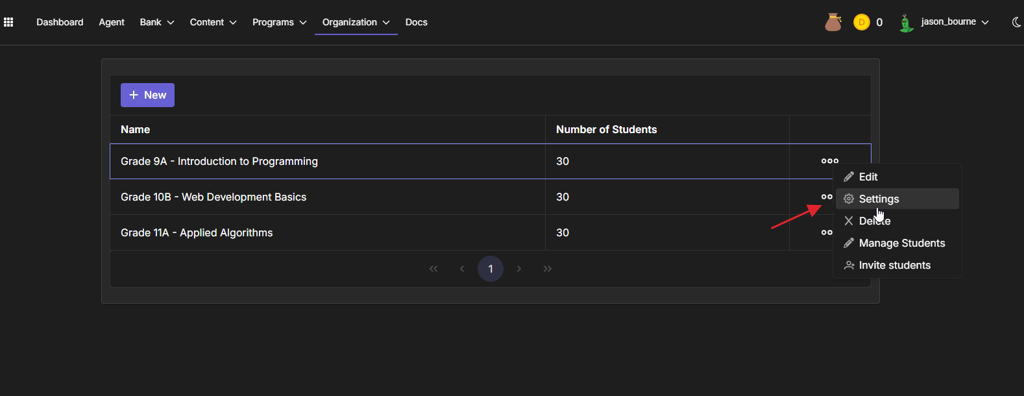
Fig. 1
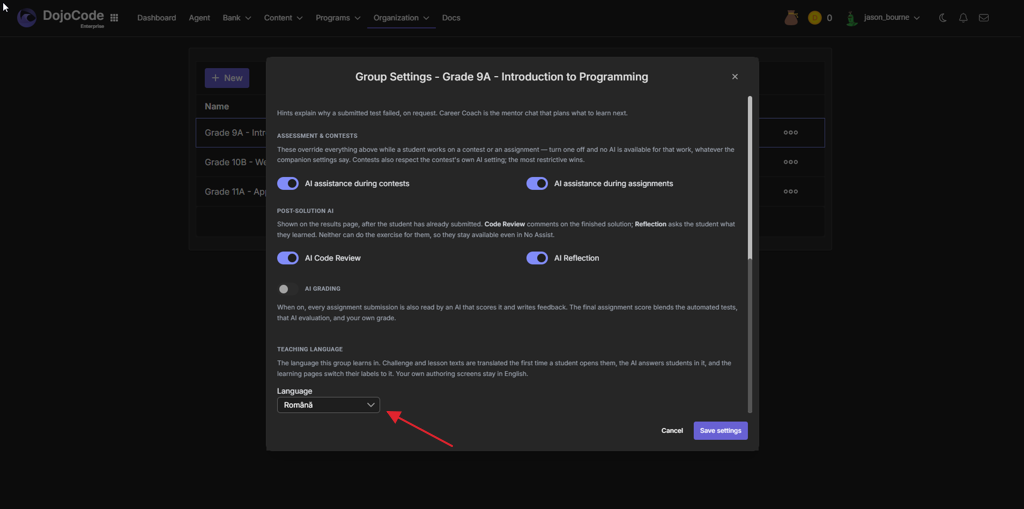
Fig. 2
The change applies to every member of the group the next time they load a page.
TIP
The group's language wins over each student's own account language for as long as they are members. A student who registers through the group's invitation link sees the language step of the registration locked on the group's language; a student who leaves the group falls back to the language chosen on their account (see Setting up your account).
Supported teaching languages: English and Română.