
AI Models Access
The DojoCode SDK is the built-in connection every DojoCode project gets to platform services — and its headline capability is access to real AI models. Your team members and students can build apps that write text, look at photos, paint images, animate videos, compose music, speak with a cloned voice and transcribe recordings, with no API keys, no vendor accounts and no billing setup on your side.
They can use it two ways:
- Ask the project assistant. They describe the feature in the project's AI chat and the assistant writes working code for the project's template.
- Call it from code. The SDK is a small HTTP API, and every template gets the connection injected automatically — see the developer reference for code examples for each template.
Who has access
AI models access needs an active premium subscription — for business accounts that means membership in an organization on a paid (non-trial) plan; personal Premium works too. Every generation costs AI tokens from the balance of the signed-in person who runs the project (see Pricing).
Projects only
The SDK is available in projects — while editing them and in their preview. It is not available inside challenges, so it never affects how challenge solutions are graded. Projects built on the PGlite, SQLite and Solidity templates have no app code that could call it, and C and C++ projects can't call it yet.
Why it works well for teams and classrooms
- No keys to hand out. Nobody creates an AI provider account, pastes an API key or risks leaking one in a repository. The connection belongs to the signed-in user and is never saved in project files.
- Every template, not just JavaScript. React, Vue, Angular, Next.js and the other browser templates, Node.js servers, Python in the browser, and command-line programs in Python, Java, Go, C#, PHP, Ruby and Rust (C and C++ are not supported yet).
- Predictable costs. Clear per-unit prices in AI tokens, automatic refunds for failed generations, and a notification after every paid generation.
- Built-in guardrails. Rate limits per user, generations only on an explicit click, and a clear warning before a project that uses the SDK is published to a public site, where its visitors spend the publisher's tokens.
- A real-world lesson. Learners work with the same patterns professional apps use — HTTP APIs, async jobs, polling, media handling and error states.
Ideas for labs and assignments
- Accessibility helper — upload a photo and generate alt text (
image-to-text). - Study buddy — turn notes into a JSON quiz rendered as multiple choice (
text-to-text). - Game asset studio — generate sprites, background music and a narrator voice for a small game (
text-to-image,text-to-music,text-to-speech). - Voice notes to tasks — transcribe a recording and extract a to-do list (
speech-to-text+text-to-text). - Command-line pipeline — a Python or Go program that submits a video generation, stores the id and fetches the result on the next run (async jobs in practice).
What can be built
| Modality | What it does | Powered by |
|---|---|---|
text-to-text | Writes, summarizes, translates, answers, returns JSON | Llama 3 (8B) |
image-to-text | Looks at a photo and answers in text | GPT-4o mini |
text-to-image | Paints images from a description | FLUX schnell |
image-to-image | Transforms a photo following a prompt | FLUX dev |
text-to-video | Generates a short video clip from a description | LTX-Video |
image-to-video | Animates a still picture | LTX-Video |
text-to-music | Composes an instrumental track | MusicGen |
text-to-speech | Speaks text in a cloned voice | Fish Speech |
speech-to-text | Transcribes (and translates) a recording | Whisper |
The models behind each modality can change as better ones become available; the modality names, inputs and outputs stay the same.
How members use it
- Create a project from any template, or open an existing one.
- Open the AI Chat panel and describe the feature in plain language — for example: "Add a studio section with a separate form for text-to-video, image-to-video and text-to-music. Show the estimated cost, a status while it runs and a player at the end."
- The assistant knows how the SDK works in that template and writes the code: reading the injected connection, handling slow generations and showing the result.
- They use the feature in the preview (or press Run for templates without a preview). Generations start only when they click.
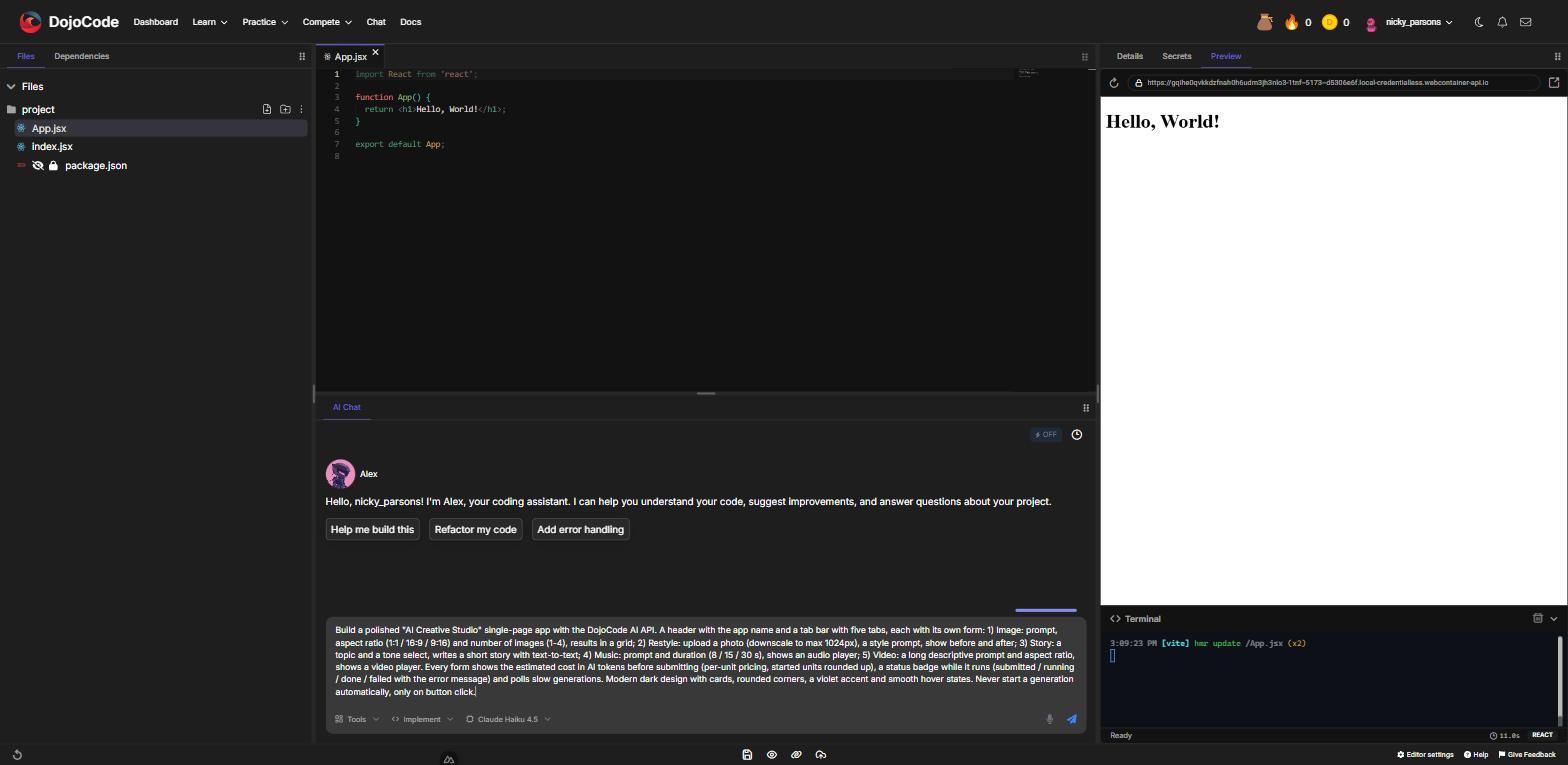
Fig. 1 - Describing the feature in the project's AI Chat
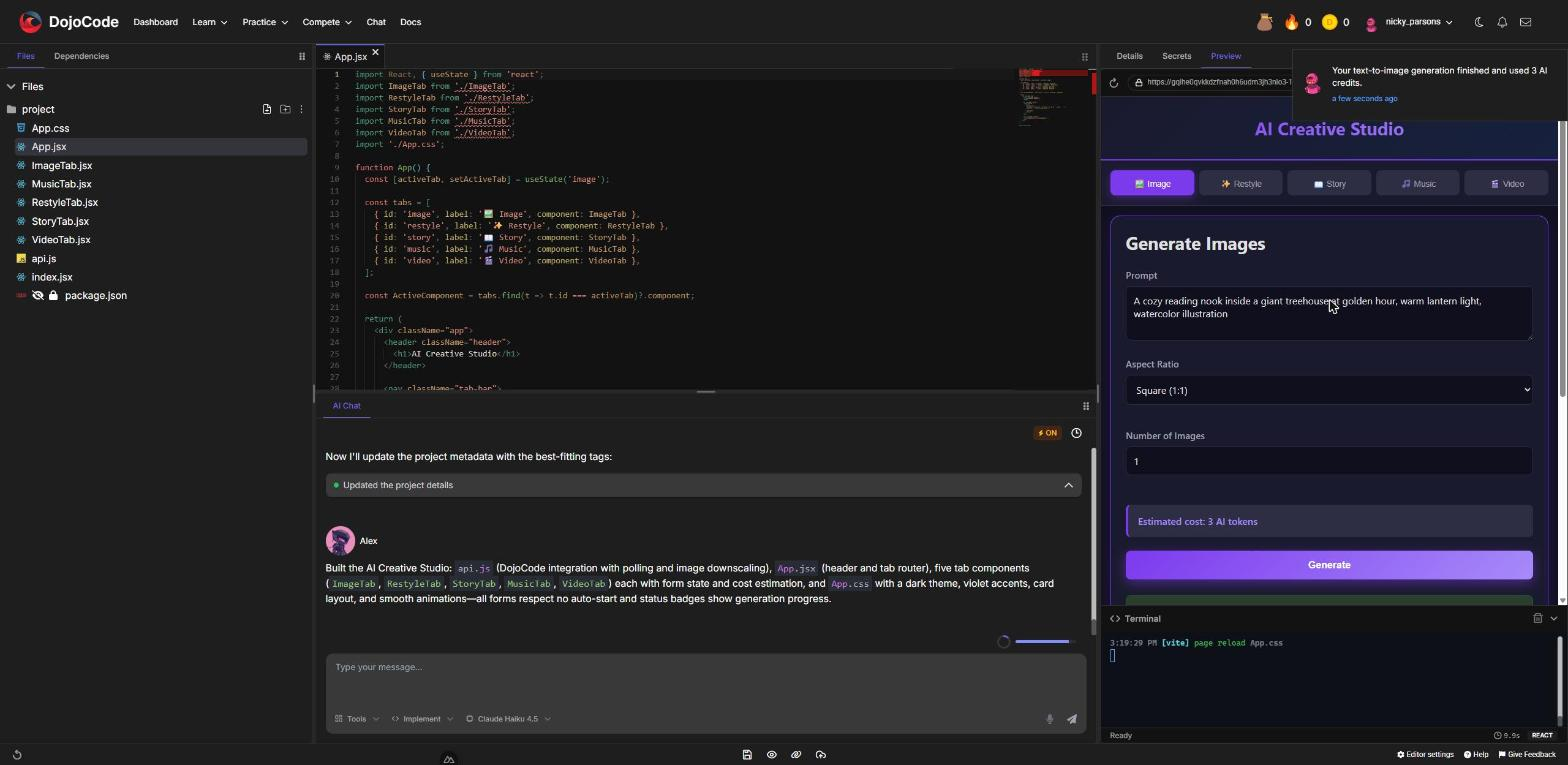
Fig. 2 - The app the assistant builds, with a form per modality and the estimated cost
Pricing
Each modality has a price in AI tokens per unit. Quantity options multiply the price, and every started unit is charged in full.
| Modality | Charged per | AI tokens |
|---|---|---|
text-to-text | request | 1 |
image-to-text | request | 2 |
speech-to-text | recording | 2 |
text-to-image | image | 3 |
image-to-image | image | 5 |
text-to-speech | 1,000 characters of text | 3 |
text-to-music | 10 seconds of music | 4 |
text-to-video | 97 frames ≈ 4 seconds of video | 12 |
image-to-video | 97 frames ≈ 4 seconds of video | 12 |
For example, four images cost 4 × 3 = 12 tokens, 30 seconds of music costs 3 × 4 = 12 tokens, and a 161-frame video counts as two started units: 2 × 12 = 24 tokens.
- Charged at submission. A request from someone without enough tokens is refused and nothing is charged.
- Refunded on failure. If the model fails, the tokens go back automatically.
- Notified every time. After each paid generation the user gets a notification with the number of AI tokens used (or refunded), and their balance updates in every open tab.
- Billed to whoever runs the project. When a member runs a teammate's or a student's project, the generations are charged to the member running it.
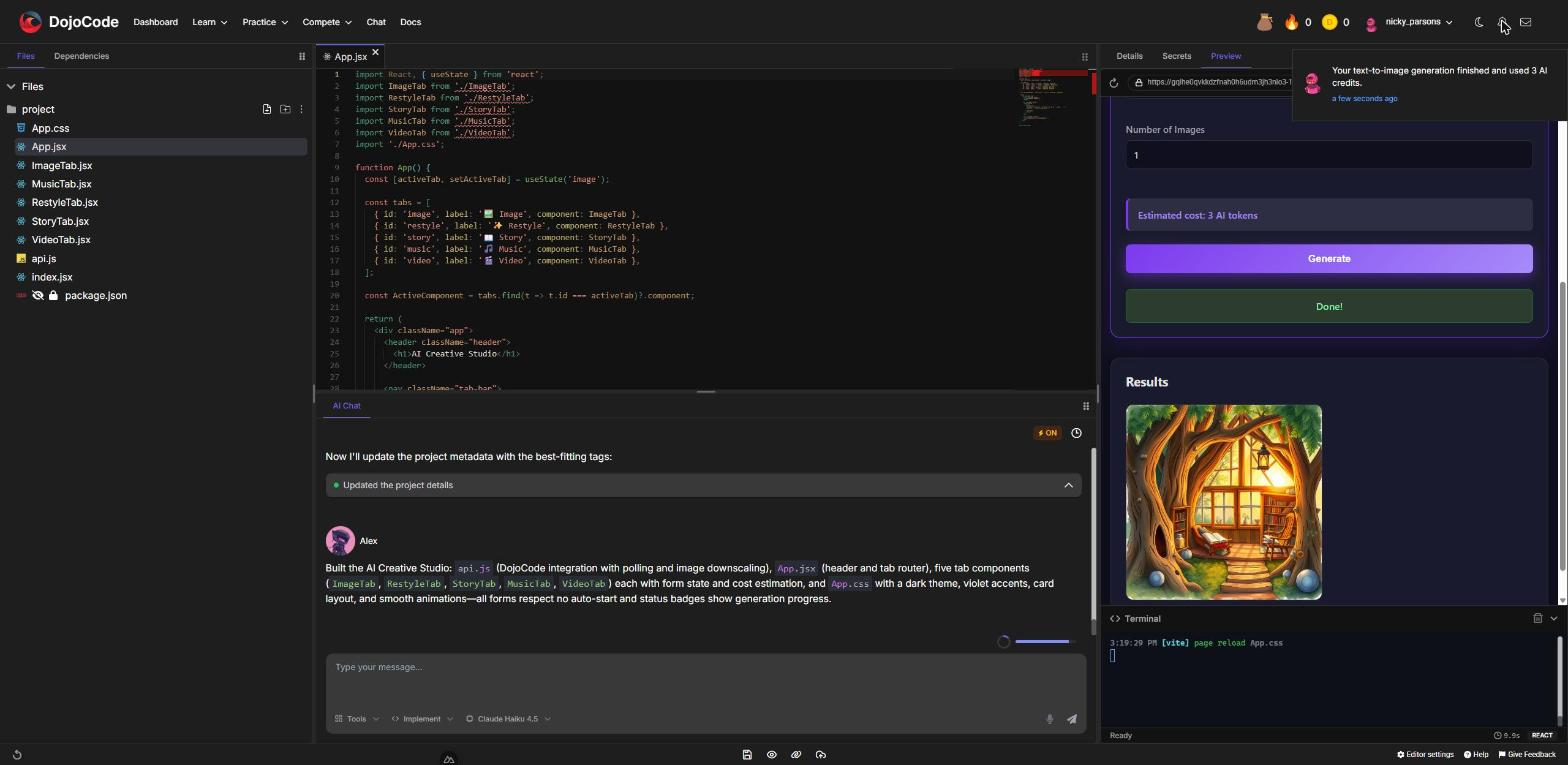
Fig. 3 - The notification each member gets after a paid generation
How a generation works
- Fast modalities (text, image analysis, images, transcription) answer with the finished result, usually within seconds.
- Slow modalities (video, music, speech) answer immediately with a pending record; the app checks it every couple of seconds until it is done — video takes one to two minutes.
- Media results are permanent links stored by DojoCode, so images, videos and audio keep working in the project.
For developers
The platform injects an API URL and an access token into every project. How they are read depends on the template:
| Template | How to read the connection |
|---|---|
| React, Vue, Svelte, SvelteKit, SolidJS, Vanilla, Remix, React Native | import.meta.env.VITE_DOJOCODE_API_URL, import.meta.env.VITE_DOJOCODE_AI_TOKEN |
| Next.js | process.env.NEXT_PUBLIC_DOJOCODE_API_URL, process.env.NEXT_PUBLIC_DOJOCODE_AI_TOKEN |
| Astro | import.meta.env.PUBLIC_DOJOCODE_API_URL, import.meta.env.PUBLIC_DOJOCODE_AI_TOKEN |
| Angular | DOJOCODE_ENV from ./dojocode-env |
| NestJS, Fastify, Hono, Node.js (preview) | process.env.DOJOCODE_API_URL, process.env.DOJOCODE_AI_TOKEN |
| Python with the browser preview | the built-in dojocode_ai module |
| Run templates: Python, Node.js, Java, Go, C#, PHP, Ruby, Rust | environment variables DOJOCODE_API_URL, DOJOCODE_AI_TOKEN |
A generation is one JSON request:
const response = await fetch(`${import.meta.env.VITE_DOJOCODE_API_URL}/ai-generation/generations`, {
  method: 'POST',
  headers: {
    'Content-Type': 'application/json',
    Authorization: `Bearer ${import.meta.env.VITE_DOJOCODE_AI_TOKEN}`
  },
  body: JSON.stringify({ modality: 'text-to-image', input: { prompt: 'a watercolor fox in the snow' } })
});
const record = await response.json(); // 200 = finished, 202 = still running: poll GET /ai-generation/generations/{id}The developer reference covers everything else:
- Endpoints, the generation record and errors
- Inputs for each modality
- Sending images and audio
- Code examples for each template
Limits and safeguards
- 30 new generations per 10 minutes per user.
- Inputs: prompts up to 4,000 characters, images up to 5 MB, audio up to 10 MB.
- Command-line runs stop after 20 seconds, so slow generations are submitted in one run and read back in the next.
- A generation that hasn't finished after 15 minutes is cancelled and refunded.
- The editor's preview panel has no microphone access — to record audio, open the preview in its own tab or upload an audio file.
Publishing projects that use the SDK
A project whose code calls the SDK can be published to a public *.dojocode.net site and keeps working there. Every generation its visitors start is charged to the AI tokens of whoever pressed Publish — a student who publishes their own project pays with their tokens, a teacher who publishes a student's project pays with theirs. The Publish dialog warns about it first.
- Wherever the project's browser code reads the site's access token — every browser template, and the client side of Next.js, SvelteKit, Remix and Astro — it is part of the public page, so anyone could spend those tokens elsewhere. Only code that runs on the server keeps it out of the page.
- Unpublishing revokes the token at once; publishing again issues a new one.
Troubleshooting
| Symptom | Fix |
|---|---|
The connection is undefined / "credentials not available" | Use exactly the variable name for the template — each browser framework uses a different prefix. |
401 after the editor was open for a long time | The session expired — reload the editor or the preview. |
403 "not enough AI tokens" or "subscription is not active" | Check the member's AI token balance and that the organization is on a paid plan. On a published site, check the account of whoever published it. |
| Tokens are charged on every save | The code starts a generation on page load — ask the assistant to trigger it from a button instead. |
A video stays running for a while | Video and speech can take a few minutes on a cold start; after 15 minutes they are cancelled and refunded. |